
A slow application doesn’t just annoy people — it quietly taxes everything around it. Shoppers abandon carts, employees lose minutes that compound across a quarter, and support queues fill with complaints that all trace back to the same root cause: the app felt sluggish. Industry research has put numbers on this for years — Akamai’s often-cited finding that around 40% of visitors abandon a site taking more than three seconds to load, Google’s widely quoted stat that 53% of mobile users bounce past the three-second mark, Amazon’s famous calculation that every 100 milliseconds of delay cost about 1% in sales. The exact figures age, but the direction never changes: speed is money.
An Application Acceleration Manager — AAM for short — exists to attack that problem at the infrastructure level. But here’s the thing nobody on Google’s first page tells you upfront: the acronym means two different things. It’s a technology, and it’s also a job title. This guide covers both, starting with the technology, because that’s what most searchers actually need.
TL;DR
- What it is: An Application Acceleration Manager is a system (hardware, software, or cloud service) that sits between users and applications, actively speeding up how data moves — through caching, compression, traffic shaping, protocol optimization, and connection management.
- What it isn’t: A monitoring dashboard (that just reports slowness), a CDN (that mostly caches static files), or a bigger internet pipe.
- Who needs one: Businesses whose apps serve users across regions, handle traffic spikes, or run on latency-sensitive workflows — SaaS, e-commerce, fintech, healthcare, remote-first teams.
- Who probably doesn’t: A small site with mostly local users and no performance complaints. An AAM fixes a problem you should first confirm you have.
- The other meaning: Some companies also hire a person called an application acceleration manager — someone whose job is owning app performance end to end. Covered briefly below.
What Is an Application Acceleration Manager?
Strip away the marketing language and the definition is straightforward: an Application Acceleration Manager is a purpose-built layer that lives between your users and your application servers, and its entire job is making the exchange between the two faster and more reliable.
When you click something in a web app, a surprising amount has to happen before anything appears on screen. Your request travels across networks, waits in server queues, pulls data from databases, gets encrypted, and travels back. Each hop adds milliseconds. An AAM inserts itself into that path and trims the waste at every step — serving repeat requests from cache instead of bothering the server, squeezing data smaller before it crosses the network, keeping connections warm so they don’t need rebuilding, and taking encryption work off the application server’s plate.
The key word in the name is manager. Single-purpose tools do one of these jobs: a compressor compresses, a cache caches. An AAM coordinates all of them as one system, watching traffic in real time and deciding which technique to apply where. That’s the difference between owning six kitchen gadgets and having one cook running the whole kitchen.
Under the hood, an AAM is usually deployed as one of three things: a physical appliance in a data center (the classic “application delivery controller”), virtual software running on your own infrastructure, or a cloud service you subscribe to. The job is the same in all three cases. What changes is who maintains the boxes and how you pay for them — more on that in the deployment section.
Two Meanings, One Acronym: Technology vs. Job Role
Because two of the pages ranking for this keyword answer a different question than the other five, let’s clear this up once.
The technology — everything in this guide except this section — is the system described above. When vendors like F5 sell “Application Acceleration Manager,” they mean software or an appliance.
The job role is a human being. Some mid-size and large companies now hire someone titled application acceleration manager (or hand the responsibility to a performance engineer). That person’s job is owning application speed end to end: finding the slow database queries, deciding where the infrastructure lives, setting up monitoring, and getting developers, ops, and executives pointed at the same performance targets. It’s a real role, and for companies with serious scale problems it’s a sensible hire — but it’s a career topic, not a technology topic, and most people typing this keyword into Google want the technology.
If you came here looking for career guidance: the core skill stack is performance engineering, networking fundamentals, cloud infrastructure, and enough data literacy to tie speed metrics to business outcomes. Certifications that help include AWS Solutions Architect and CCNA-level networking credentials. Now back to the technology.
How an AAM Actually Works
An AAM doesn’t rely on one trick. It layers six techniques, applying each where it helps most. Here’s what each one actually does, without the brochure language.
Traffic shaping and load balancing
When a flood of requests arrives at once — a product launch, a Monday-morning login rush — the AAM decides which server handles what. It spreads the load so no single machine chokes, and it can prioritize: checkout traffic jumps the queue ahead of background analytics syncs. Think of it as a bouncer who knows the VIP list.
Compression
Data gets squeezed before it crosses the network and expanded on arrival. Modern AAMs use current algorithms — Brotli and Zstandard have largely replaced gzip for this work because they compress tighter at similar speeds. For text-heavy responses (HTML, JSON, APIs), compression alone can cut transfer sizes by 60–80%, which is often the single biggest win on slow connections.
Caching
If a thousand users request the same product image, logo, or API response, there’s no reason to build it from scratch a thousand times. The AAM keeps copies of frequently requested content close to users and serves them directly. Good caching setups also use hierarchies — edge caches for the hottest content, regional caches behind them — so even a “miss” at the edge is usually a fast hit one layer down.
TCP and protocol optimization
The internet’s core transport protocol, TCP, was designed in an era of wired networks and behaves cautiously on long or lossy paths — it ramps up speed slowly and pauses to confirm every delivery. An AAM tunes these behaviors: larger initial windows, smarter congestion control, fewer round trips. On a transatlantic connection, shaving even one round trip (around 75ms) off every request compounds fast across a page that makes dozens of them.
TLS/SSL offloading
Encryption is expensive. Every HTTPS connection requires cryptographic handshakes that eat server CPU. The AAM terminates those encrypted connections itself, talks to the backend servers over a trusted internal channel, and frees the application servers to do actual application work. On high-traffic sites, this alone can cut server load dramatically.
Connection reuse and multiplexing
Opening a fresh network connection for every click wastes time on handshakes. The AAM keeps pools of warm connections open to backend servers and multiplexes many user requests over them. The user perceives this as the app simply feeling instant.
The request lifecycle, end to end
Put together, a single user request flows roughly like this:
- Arrival and inspection — the request hits the AAM, which classifies it: static asset, API call, checkout transaction, background sync.
- Cache check — if it’s a repeat request for cacheable content, the response goes straight back. Done in milliseconds.
- Routing — uncached requests get assigned to the healthiest, least-loaded backend.
- Optimization — the response is compressed, protocol-tuned, and prioritized on the way out.
- Encryption handling — TLS work happens on the AAM, not the app server.
- Feedback — timing data feeds back into the system, so routing and caching decisions keep improving as traffic patterns shift.
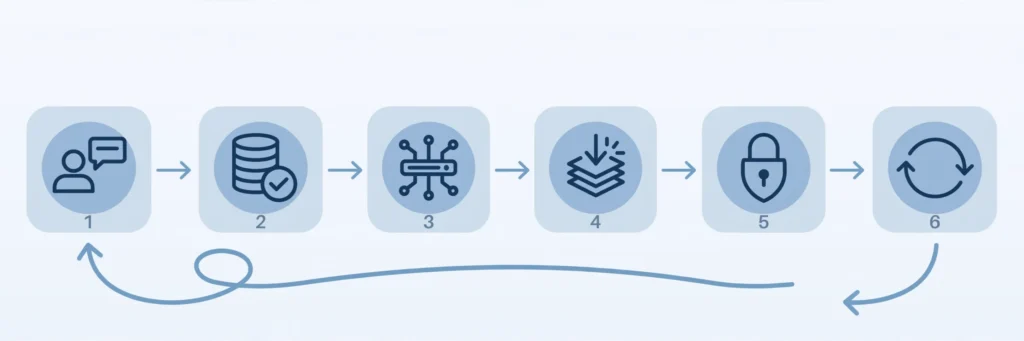
None of this is visible to the user. They just notice the app feels quick.
AAM vs. Everything It Gets Confused With
People mix these terms up constantly — several ranking pages try to untangle two or three of them, but none lays out the full picture. Here it is:
| Technology | What it actually does | What it doesn’t do |
|---|---|---|
| Application Acceleration Manager | Coordinates caching, compression, traffic shaping, and protocol optimization as one active system | Replace your servers or fix bad application code |
| CDN (Content Delivery Network) | Caches static content on servers near users | Optimize dynamic, personalized app traffic |
| Application accelerator (generic) | Speeds up one specific thing (e.g., a WAN link, a single protocol) | Manage the whole performance picture |
| WAN optimizer | Improves transfers specifically across wide-area links between offices | Help a public-facing web app’s global users |
| APM (Application Performance Monitoring) | Measures and reports where slowness lives | Fix anything — it’s a thermometer, not medicine |
| Load balancer | Distributes traffic across servers | Compress, cache, or optimize protocols |
| WAF (Web Application Firewall) | Blocks malicious traffic | Improve speed (it can add latency, if anything) |
The practical takeaway: these tools stack. A typical enterprise runs an AAM alongside a CDN, a load balancer, and APM — the AAM is the layer that actively squeezes performance out of the traffic passing through it.
Deployment Models: Hardware, Software, Cloud, Edge
Where the AAM lives changes the cost, the maintenance burden, and how fast you can get started. There are four patterns in 2026:
| Model | How it works | Best for | Watch out for |
|---|---|---|---|
| Hardware appliance (ADC) | Physical box in your data center, e.g., F5 BIG-IP hardware | Regulated industries, predictable heavy traffic, teams that want full control | Upfront cost, capacity planning, hardware refresh cycles |
| Virtual/software | Same software as the appliance, running on your VMs or private cloud | Hybrid setups, teams virtualizing everything anyway | You still own patching, scaling, and uptime |
| Cloud / SaaS | Vendor runs it; you configure policies and read dashboards | Fastest start, spiky or growing traffic, lean IT teams | Ongoing subscription cost, less control over the data path |
| Edge-distributed | Optimization logic runs at edge points of presence near users | Global user bases, latency-sensitive apps | Pricing can scale sharply with traffic; vendor lock-in |

There’s no universally right answer. A bank with strict data-residency rules will pick hardware or virtual on-prem. A SaaS startup doubling every quarter will pick cloud and never think twice. The wrong choice is usually picking the model that doesn’t match how the rest of your infrastructure already works.
The Business Benefits, Stated Plainly
- Happier users who stick around. Fast pages keep people engaged; slow ones train them to leave. This is the benefit everything else ladders up to.
- More productive employees. Internal tools that respond instantly instead of hanging on every click give teams real hours back every week.
- Infrastructure that lasts longer. When traffic is shaped, cached, and compressed before it hits your servers, the servers you already own handle more load. Upgrades get deferred, sometimes by years.
- Lower bandwidth bills. Less data crossing the network means less metered transit to pay for — compression and caching attack this directly.
- Room to grow. Traffic spikes stop being emergencies. The system absorbs them by design instead of by heroics from the ops team at 2 a.m.
- Security without the speed penalty. TLS offloading plus centralized traffic inspection means encryption and threat filtering happen in one place, tuned for performance rather than bolted on as an afterthought.
The 6 Metrics That Prove It’s Working
An AAM without measurement is just an expensive box. These are the numbers that tell you whether yours is earning its keep — and, crucially, the targets to aim for, which none of the ranking pages bother to publish:
| Metric | What it tells you | Healthy target |
|---|---|---|
| Latency | Time for data to travel between user and server | < 100 ms regionally; < 200 ms intercontinental |
| Time to First Byte (TTFB) | How fast the server starts responding | < 200 ms for dynamic content |
| Throughput | Data moved per second under load | Stable as concurrent users scale (no cliff) |
| Response time | Full round trip for a user action | < 500 ms for interactive actions |
| Error/timeout rate | Share of requests that fail | < 0.1% at steady state |
| Cache hit ratio | Share of requests served from cache | > 80% for static-heavy workloads |
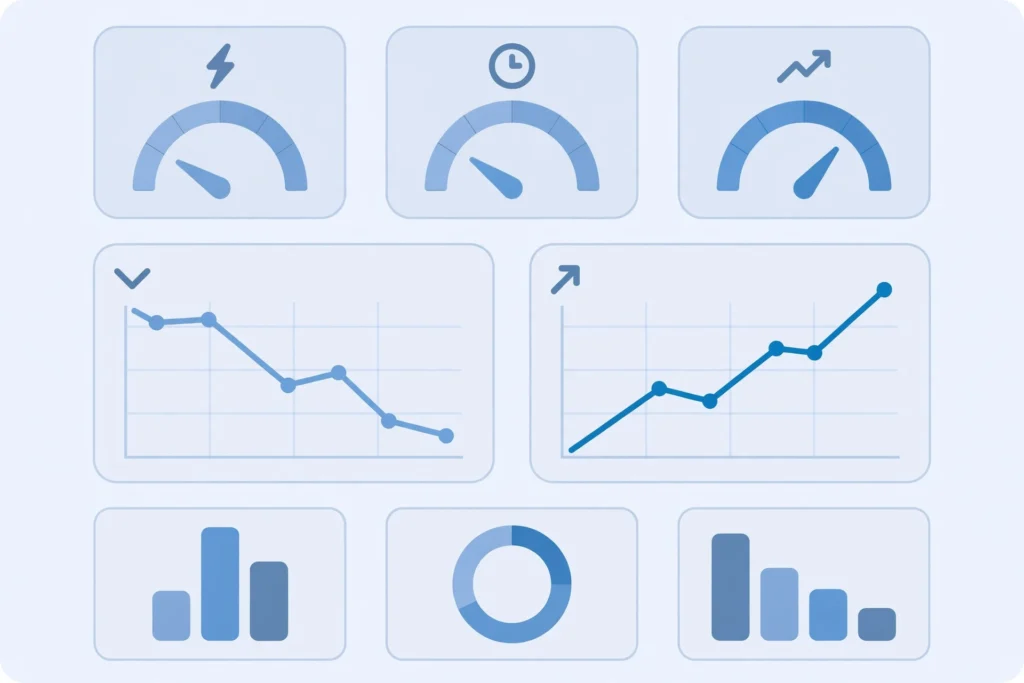
Measure these before deployment to establish a baseline, then weekly after. If latency and TTFB don’t move within the first month, the configuration — not the concept — is the problem.
Where It Matters Most: 6 Industries
- E-commerce and retail. Checkout speed is revenue. Acceleration keeps product pages and payment flows fast when a sale floods the site — the difference between a record day and a very public outage.
- SaaS and cloud platforms. Customers in twelve time zones all expect the same snappy experience. An AAM evens out the geography.
- Financial services. Trading screens and banking apps live or die on milliseconds. AAMs keep transaction paths prioritized and consistent during market volatility.
- Healthcare. Clinicians pulling up imaging and patient records can’t wait on spinning loaders. Here, acceleration isn’t about revenue — it’s about care delivery.
- Gaming and streaming. Low ping and zero buffering are the product. Techniques like forward error correction keep streams smooth even on lossy mobile networks.
- Remote and hybrid work. Distributed teams hitting centralized apps across home broadband is exactly the high-latency, unpredictable-network scenario AAMs were built for.
Honest Limitations
No technology section is complete without the parts vendors skip:
- Setup is genuinely complex. Misconfigured traffic rules can make things slower than no AAM at all. Budget real engineering time for the rollout, not just the license.
- It costs real money. Between licenses or subscriptions, implementation, and ongoing tuning, this is a five- or six-figure annual commitment at enterprise scale. Small businesses should do the math carefully.
- Legacy apps can fight back. Older applications built on chatty protocols or ancient encryption may need custom rules — or partial modernization — before acceleration helps.
- Encrypted traffic is getting harder to inspect. This is the limitation nobody mentions: as TLS 1.3 and QUIC encrypt more of the conversation (even the handshake details older tools relied on), some classic optimization tricks stop working. Modern AAMs adapted, but it’s an arms race — verify any vendor’s QUIC story specifically.
- It won’t fix bad code. If your application takes four seconds because of an unindexed database query, no amount of network optimization will save it. Fix the app first.
How to Choose the Right AAM
The 7 criteria that actually matter
- Deployment fit. Match the model to your infrastructure (see the table above). Don’t buy hardware if everything you own is already in the cloud.
- Scalability headroom. Size for 18 months of growth, not today. Ask how licensing scales — per-throughput, per-user, or flat — and model the cost at 3x traffic.
- Protocol coverage. Confirm support for HTTP/3 and QUIC, modern TLS, WebSockets, and whatever your stack actually speaks. “Supports everything” on a datasheet deserves a lab test.
- Security integration. TLS offloading, WAF capabilities, DDoS handling, and compliance certifications (SOC 2, ISO 27001, GDPR posture) matter as much as speed.
- Observability. You need live dashboards showing per-application latency, cache ratios, and error rates — not a PDF report emailed monthly.
- Ecosystem compatibility. It must play cleanly with your CDN, your cloud provider, and your CI/CD pipeline. Ask for reference customers on your exact stack.
- Vendor support quality. You’ll need them most during the first 90 days. Check support SLAs, escalation paths, and whether you get a named engineer — before you sign.
The vendor landscape in 2026
The market has consolidated around a few serious names. F5’s BIG-IP Application Acceleration Manager is the reference implementation the category is named after — an ADC-based platform with deep protocol optimization, and F5 publishes unusually concrete performance claims (its launch data cites up to 50% cuts in first-visit page load times for SaaS apps and up to 75% throughput gains on lossy mobile links) alongside a free self-test tool called FAST for benchmarking your own apps. Citrix ADC (formerly NetScaler) plays in the same ADC space. Riverbed comes from the WAN-optimization world and is strongest for branch-office scenarios. Akamai and Cloudflare approach acceleration from the CDN/edge side — less about your data center, more about the global network in front of it. AWS covers the cloud-native corner with CloudFront and Global Accelerator. Evaluate two or three across categories, not just within one.
Run a 2-week proof of concept before you buy
- Baseline first. Record the six metrics above for your two most important applications for one full week.
- Define pass/fail. Write down the improvement that justifies the cost (e.g., “TTFB under 200 ms for 95% of requests”) before the vendor’s engineer arrives.
- Test real traffic. A lab demo proves nothing. Mirror production traffic or run a canary slice.
- Measure the same six metrics. Same dashboards, same time windows.
- Check the operational load. Who configures it, who gets paged, how do upgrades work? The best-performing box that nobody on your team understands is a liability.
What Does It Cost?
Nobody on the first page answers this, so let’s fix that — with the caveat that enterprise pricing is famously quote-driven, so treat these as order-of-magnitude ranges, not quotes:
- Hardware ADCs: the classic enterprise route. Appliances plus licenses run from the tens of thousands into six figures. For a concrete anchor: reseller listings price a mid-tier BIG-IP AAM software license (5 Gbps throughput) in the mid-$30k range — and that’s before the hardware or support contract.
- Virtual/software licenses: typically 30–50% below the hardware equivalent, usually subscription-based annually.
- Cloud/SaaS acceleration: the most accessible entry point — from a few hundred dollars a month for CDN-plus-optimization bundles at small scale, scaling with bandwidth into the thousands monthly for serious traffic.
- The hidden line items: implementation services, training, and the engineering hours for tuning often add 20–40% to the first-year cost. Budget for them explicitly.
The ROI math that justifies it: compare the annual cost against the cost of not fixing the problem — lost conversions from slow pages, infrastructure upgrades you’d otherwise need, and engineering hours currently spent firefighting performance incidents. If those numbers don’t exceed the AAM’s cost, you don’t need one yet.
Do You Even Need One?
A quick decision flow, because the honest answer is sometimes no:
- Your app is fast and users are happy? Don’t buy anything. Revisit when growth changes the picture.
- Slowness traced to application code or database queries? Fix those first — an AAM can’t optimize a bad query.
- Mostly static content with a global audience? A plain CDN probably covers 90% of what you need at a fraction of the cost.
- Dynamic app, users across regions, traffic spikes, latency complaints? That’s the AAM-shaped problem. Run the POC.
- Regulated industry with strict data control? You likely need the hardware or virtual route specifically — factor that into vendor selection from day one.
AAM in 2026 and Beyond
Four shifts are reshaping the category:
- AI-driven auto-tuning. The newest platforms watch traffic patterns and adjust caching, routing, and compression policies themselves instead of waiting for an engineer to notice. Early vendor data suggests meaningful drops in time-to-resolution for performance incidents — but treat every AI claim as “verify in your POC” until it’s proven on your traffic.
- Edge computing convergence. More logic runs at edge locations near users, which collapses the distance data travels. AAM functionality is increasingly just part of edge platforms rather than a separate box.
- QUIC and HTTP/3 as the default. As the modern transport stack takes over, acceleration techniques are being rebuilt around it. Any vendor whose story here is vague is selling yesterday’s product.
- Zero-trust security baked in. Performance and security tooling are merging — traffic inspection, identity-aware routing, and encryption happen in one policy engine instead of three disconnected products.
The direction is clear: less manual knob-turning, more autonomous optimization, and acceleration disappearing as a standalone category into the broader edge platform. Buying decisions made today should favor vendors moving that way.
FAQs
What is an application acceleration manager in simple terms?
It’s a system that sits between your users and your servers and makes your applications load faster — by caching repeat content, compressing data, balancing traffic across servers, and optimizing how data travels over the network.
How does an application acceleration manager work?
It intercepts traffic between users and application servers, then applies a combination of caching, compression, load balancing, TCP/protocol optimization, TLS offloading, and connection reuse — adjusting in real time based on traffic conditions.
What’s the difference between an application acceleration manager and an application accelerator?
An accelerator usually does one thing (like compress data on a WAN link). A manager coordinates multiple acceleration techniques as one system. Think single tool versus whole toolkit with someone operating it.
Is application acceleration the same as APM?
No. APM (Application Performance Monitoring) measures and reports performance problems. An AAM actively fixes them. You often want both: APM tells you where it hurts, the AAM makes it stop hurting.
Can an AAM replace my CDN?
Not exactly. A CDN caches static content near users; an AAM optimizes the full application traffic picture including dynamic, personalized content. They complement each other — many setups run both.
Hardware, software, or cloud — which deployment is best?
It depends on your infrastructure. Hardware suits regulated industries and predictable heavy traffic; software/virtual fits hybrid data centers; cloud is fastest to start and scales easiest. Match the model to how you already run things.
How much does an application acceleration manager cost?
Roughly: hardware ADC routes run from tens of thousands to six figures annually; virtual licenses run lower; cloud/SaaS options start around a few hundred dollars a month and scale with traffic. Always budget 20–40% extra for implementation and tuning in year one.
Is an AAM worth it for a small business?
Usually not as a dedicated purchase — the cost rarely justifies itself below serious traffic levels. Small businesses typically get 90% of the benefit from a good CDN and basic caching. Revisit when latency complaints or traffic spikes become a pattern.
Will it work with legacy applications?
Often yes, but expect extra configuration — older protocols and encryption standards may need custom rules. Test your specific legacy apps during the proof of concept, not after signing.
What’s the difference between the technology and the job role?
The technology is the system described in this guide. The job role is a person hired to own application performance end to end — a performance engineer by another name. Same acronym, completely different hiring decision.
The Bottom Line
An Application Acceleration Manager is one of those rare infrastructure purchases that touches everything: revenue, productivity, infrastructure spend, and user trust all move when application speed moves. The technology itself is mature — the techniques are well understood and the vendors are established. What separates a good AAM deployment from an expensive mistake isn’t the product, it’s the process: baseline your metrics, define what success looks like, test with real traffic, and be honest about whether you even have the problem it solves.
The companies that get this right don’t think of acceleration as a box they bought. They think of it as a performance budget they manage — measured, tuned, and revisited as traffic grows. Start measuring before you start shopping, and you’ll already be ahead of most of the internet.