Somewhere on your Instagram feed right now, someone you know just posted a cinematic portrait that looks like a movie still. Or a retro 90s photo that looks straight out of a family album. Or a professional headshot they’d never pay a photographer for. None of them hired anyone. They uploaded a selfie to Google’s Gemini, pasted a prompt, and got back magic.
That magic has a name people keep searching for: the “Nano Banana” image model inside Gemini — Google’s photo editing engine that became famous for one specific superpower. It restyles your photo completely while keeping your face recognizably yours. Weaker tools give you a pretty stranger. Gemini gives you a better you.
This guide is 40 copy-paste prompts organized the way people actually search for them: trending boy portraits, trending girl portraits, couples, 3D figures, retro looks, headshots, festival edits, and restorations. Every prompt is ready to copy, and every one comes with a short note on why it works — because understanding the pattern means you’ll never need someone else’s prompt again.
How to Use These Prompts in Gemini
Step 1 — Open Gemini and upload your photo
Go to the Gemini app or website. For photo-editing prompts (which is most of this list), upload your photo first using the image button, then paste the prompt. For pure generation prompts, just paste — no upload needed. A clear, well-lit source photo gives cleaner results than a dark blurry one, every time.
Step 2 — Paste the prompt exactly as written
Copy the full prompt block, paste it into Gemini, and hit send. The prompts below are written with the face-preservation language Gemini responds to best — don’t trim those lines thinking they’re filler. They’re the load-bearing walls.
Step 3 — Regenerate or refine
If the first result isn’t right, don’t rewrite the whole prompt. Reply with a targeted fix: “keep everything, but make the lighting warmer” or “same photo, sharper face.” Gemini holds context across turns, so refinement beats restarting. Google’s official image generation documentation confirms the model is built for this kind of conversational editing.
Trending Boy Portrait Prompts
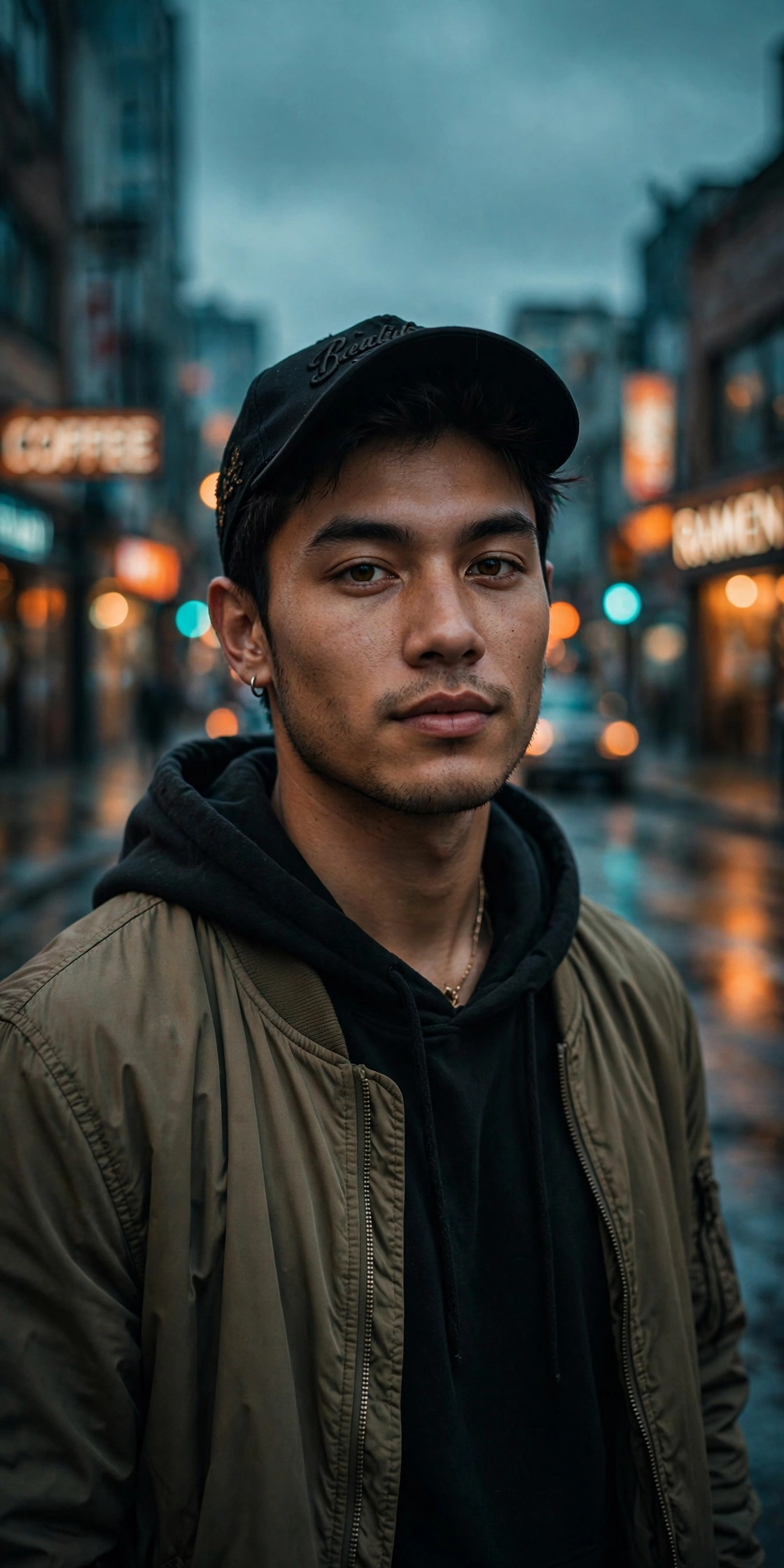
The Cinematic Street Portrait
Edit the uploaded photo. Keep the same face, features, and expression exactly — preserve the original identity completely. Restyle into a cinematic urban street portrait: moody overcast light, teal-and-orange color grade, blurred city street background at dusk, confident casual streetwear (dark jacket, plain tee), shallow depth of field, film-still mood, vertical 4:5 frame. Keep skin texture natural and true to life, no smoothing.Why it works: the teal-and-orange grade is the most-copied cinematic look on social media, and “film-still mood” tells the model to compose like a movie frame rather than a selfie.
Neon-Noir Detective
Edit the uploaded photo. Keep the face identical — same features, same expression, no beautification. Transform into a neon-noir portrait: the subject in a dark overcoat, standing in a rain-soaked alley at night, pink and cyan neon signs reflecting on wet pavement, dramatic rim lighting outlining the silhouette, cigarette-smoke haze in the air, ultra-detailed, cinematic 8K, moody and mysterious.Why it works: neon-noir is a whole aesthetic in two words — the model knows this genre cold, so you get atmosphere for free instead of describing every light source.
80s Retro Portrait
Edit the uploaded photo. Preserve the exact face, identity, and natural expression. Restyle into an authentic 1980s portrait: voluminous retro hairstyle, vintage denim jacket, warm cinematic lighting, faded film colors, soft analog grain, subtle vignette. Photorealistic, natural skin texture, no face change, no AI look. 4:5 aspect ratio.Why it works: “no AI look” is doing quiet heavy lifting — it steers the model away from the plasticky smoothness that gives away AI edits.
Gym Attitude Shot
Edit the uploaded photo. Keep the person's face exactly the same. Place them in a moody gym setting: dramatic overhead lighting, dark background with faint equipment silhouettes, wearing a fitted black t-shirt, arms crossed, confident intense expression, sweat detail on skin, high-contrast athletic photography style, ultra-sharp, 4:5.Why it works: attitude portraits live or die on lighting — “dramatic overhead” plus “dark background” creates the contrast that makes these look powerful instead of flat.
Mountain Cliff Portrait
Edit the uploaded photo. Keep the face 100% identical. Create a hyper-realistic cinematic portrait of the person standing confidently on a sunlit mountain cliff at sunrise, wearing a tailored light grey jacket over a white t-shirt, wind-tousled hair, golden-hour light with long dramatic shadows, mist in the valley below, sweeping mountain background, epic adventure mood, UHD 8K detail, editorial fashion aesthetic.Why it works: epic backgrounds do the emotional work — the prompt barely describes the person because the landscape carries the entire image.
Spider-Man Style Edit
Edit the uploaded photo. Keep the face exactly the same. Dress the person in a red-and-blue Spider-Man bodysuit on the upper body with casual grey sweatpants below, white sneakers, holding a Spider-Man mask in one hand, standing on a city rooftop at golden hour, "hero off-duty" vibe, photorealistic fabric texture, cinematic lighting, ultra-detailed 8K.Why it works: the “off-duty hero” framing is what makes this trend — full costume looks like cosplay, but the mixed outfit reads as a lifestyle photo with a twist.
Royal Sherwani Portrait
Edit the uploaded photo. Preserve the face, features, and expression exactly. Dress the person in an elegant cream-and-gold sherwani with intricate embroidery, standing in a grand palace courtyard with arched sandstone architecture, warm late-afternoon light, marigold garlands softly blurred in the foreground, regal confident pose, rich cinematic color grade, ultra-detailed, 4:5.Why it works: cultural specificity beats generic “traditional” — naming the garment, the architecture, and the flowers gives the model concrete visual anchors instead of vague vibes.
Trending Girl Portrait Prompts
Soft-Glam Portrait
Edit the uploaded photo. Keep the same face, features, and expression exactly — preserve identity completely. Restyle into a soft-glam studio portrait: dewy luminous skin, soft rosy makeup, glossy lips, gentle butterfly lighting, pastel seamless background, high-key diffused light, hyper-realistic fashion photography, 8K. Natural skin texture, no plastic smoothing.Why it works: this is the single most-copied Gemini format for a reason — “butterfly lighting” plus “dewy skin” is the professional beauty formula, and the identity line keeps it you.
Saree Ethnic Elegance
Edit the uploaded photo. Keep the face identical — same features, same gentle expression. Dress the person in a deep maroon silk saree with gold zari border, traditional gold jhumka earrings, hair in a sleek low bun with a small white flower, standing against a softly blurred heritage haveli backdrop, warm golden-hour glow, elegant timeless mood, cinematic portrait photography, ultra-detailed 4:5.Why it works: the jewelry and hairstyle details matter as much as the saree — “jhumka” and “low bun with flower” are what separate a real ethnic portrait from a costume.
Golden-Hour Beach Portrait
Edit the uploaded photo. Preserve the face exactly. Restyle into a golden-hour beach portrait: the person in a flowing white linen dress, walking toward the camera on wet sand, strong sunset backlight creating a glowing rim around wind-blown hair, dramatic lens flare, ocean waves softly blurred behind, film grain, 35mm aesthetic, dreamy and warm.Why it works: backlight is the cheat code for flattering portraits — the rim light sculpts the subject while the flare hides a multitude of sins.
Y2K Flash Photo
Edit the uploaded photo. Keep the same face and identity exactly. Restyle into a Y2K early-2000s digital-camera photo: harsh direct on-camera flash, slightly washed cool colors, fine digital noise, candid party framing, low-fi nostalgic mood, authentic 2003 point-and-shoot aesthetic. Keep skin texture natural.Why it works: the “flaws” are the style — flash glare, noise, and washed color are what make it read as authentically 2003 instead of a filter.
Aura-Farm Portrait
Edit the uploaded photo. Keep the same face and identity exactly. Restyle into an aura-farm aesthetic portrait: dramatic colored rim light glowing around the subject (deep violet), moody dark atmospheric background, soft volumetric haze, confident low-angle framing, rich cinematic color grade, subtle particles in the air, high-detail vertical portrait. Natural skin texture.Why it works: “aura-farm” is Gen-Z shorthand the model understands — one phrase buys you the rim light, the haze, and the low angle all at once.
Retro Bollywood Heroine
Edit the uploaded photo. Preserve the face, features, and expression exactly. Restyle into a retro 90s Bollywood heroine portrait: voluminous dark wavy hair, classic winged eyeliner, elegant pastel salwar kameez, standing against a vintage painted studio backdrop, soft dreamy lighting, gentle film grain, nostalgic cinematic warmth, 4:5.Why it works: era + industry (“90s Bollywood”) gives the model a complete visual library — the hair, makeup, backdrop, and grading all come from one reference point.
Cyberpunk Portrait
Edit the uploaded photo. Keep the face identical. Transform into a cyberpunk portrait: the person in a black techwear jacket with subtle glowing accents, standing in a rain-soaked neon street in Tokyo at night, pink and cyan reflections on wet asphalt, holographic signs blurred behind, cinematic teal-and-magenta grade, ultra-detailed, futuristic and edgy.Why it works: cyberpunk is one of the most visually codified genres in the model’s training — location plus two neon colors is all it needs.
Couple Photo Prompts
Cinematic Couple Portrait
Edit the uploaded photo of two people. Keep both faces, skin tones, and expressions exactly as they are — preserve both identities, do not merge or alter features. Restyle into a cinematic couple portrait: coordinated neutral-tone outfits, soft directional lighting, blurred city-evening background, natural closeness, warm film color grade, shallow depth of field, magazine-cover quality, 4:5.Why it works: the “do not merge features” line is essential — couple edits are where models most often blend two faces into one, and this fences it off.
Wedding Portrait
Edit the uploaded couple photo. Keep both faces exactly unchanged. Restyle into a timeless wedding portrait: elegant formal attire (sherwani and lehenga with gold detailing), soft romantic garden setting with blurred floral arches, dreamy diffused daylight, gentle bokeh, warm celebratory color grade, fine-art wedding photography style, ultra-detailed.Why it works: specifying both outfits prevents the common failure where the model dresses the couple in mismatched styles from different cultures.
Polaroid Couple Memory
Edit the uploaded couple photo. Keep both faces clear and recognizable. Restyle as a classic Polaroid instant photo: white Polaroid border, slightly faded colors, lifted blacks, subtle vignette, soft grain, warm nostalgic tones, the feel of a photo found in a family album from the 1980s. Candid and genuine.Why it works: the Polaroid frame does psychological work — it tells the viewer “memory” before they even process the image, which is why these get saved and shared.
Beach Sunset Silhouette
Using the two people in the uploaded photo, generate a beach sunset silhouette image. The couple faces each other in silhouette against a vivid orange and pink sunset sky reflecting on calm wet sand. Low horizon, soft romantic mood. Faces do not need to be visible — the silhouette is the artistic focus. Serene and cinematic.Why it works: silhouettes sidestep the hardest problem (two-face preservation) entirely — when identity doesn’t matter, the model can focus purely on beauty.
Rainy City Night Couple
Edit the uploaded couple photo. Keep both faces exactly the same. Restyle into a cinematic rainy-night scene: the couple sharing one umbrella on a wet city street, neon signs reflecting in puddles, stylish coats with raindrops visible, blurred bokeh lights behind, dramatic and intimate mood, teal-and-orange grade, photorealistic 8K.Why it works: rain plus neon is the highest-atmosphere-per-word combination in prompt writing — two elements that each carry enormous visual weight.
3D Figure & Toy Prompts
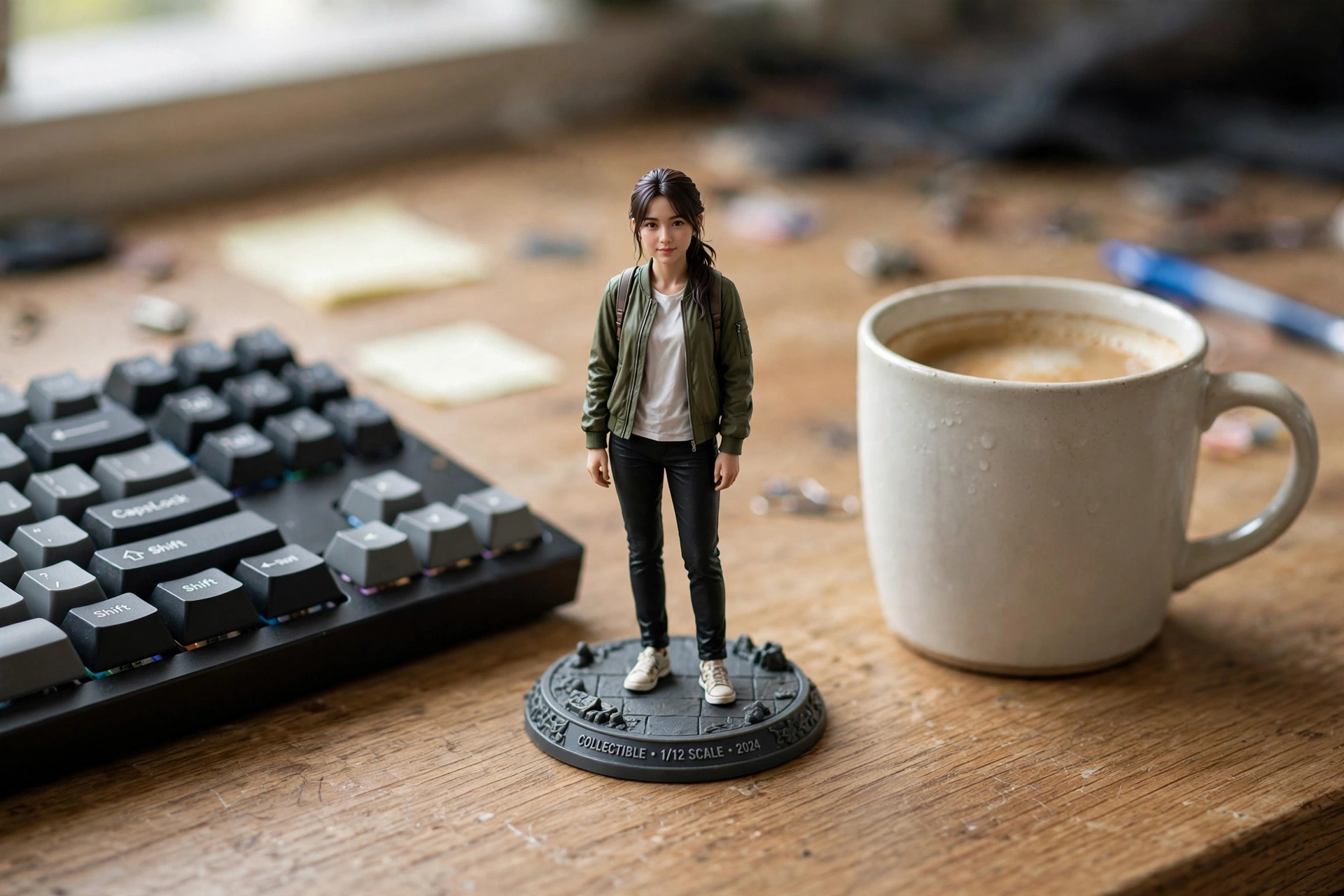
Desk Collectible Figure
Edit the uploaded photo. Turn the person into a realistic 3D collectible figure standing on a wooden desk next to a keyboard and a coffee mug for scale. Keep their face, hairstyle, and outfit recognizable. Add subtle plastic-model texture, a detailed base, soft desk lighting, shallow depth of field, believable miniature scale, vertical 4:5 social frame.Why it works: the “for scale” objects (keyboard, mug) are what sell the illusion — without them it’s just a small person, with them it’s unmistakably a toy.
Boxed Action Figure
Edit the uploaded photo into a boxed action figure. Keep the person's face and style recognizable. Place the figure inside a clear blister package with a printed backing card, bold product name at the top, small accessory icons, realistic toy photography, studio lighting, collectible designer-toy aesthetic, 4:5.Why it works: the blister-pack format went viral because it’s a “reveal” — the packaging framing makes an ordinary photo feel like a product launch.
Retro Toy Commercial
Edit the uploaded photo. Transform the person into a 1980s toy commercial still: plastic action-figure version of themselves posed dynamically against a bright gradient background with starburst graphics, bold retro typography space at the top, saturated colors, glossy toy finish, nostalgic Saturday-morning-cartoon energy, 4:5.Why it works: nostalgia plus personalization — it hits the childhood-memory button while starring the viewer, which is the exact formula for shares.
Retro & Vintage Prompts
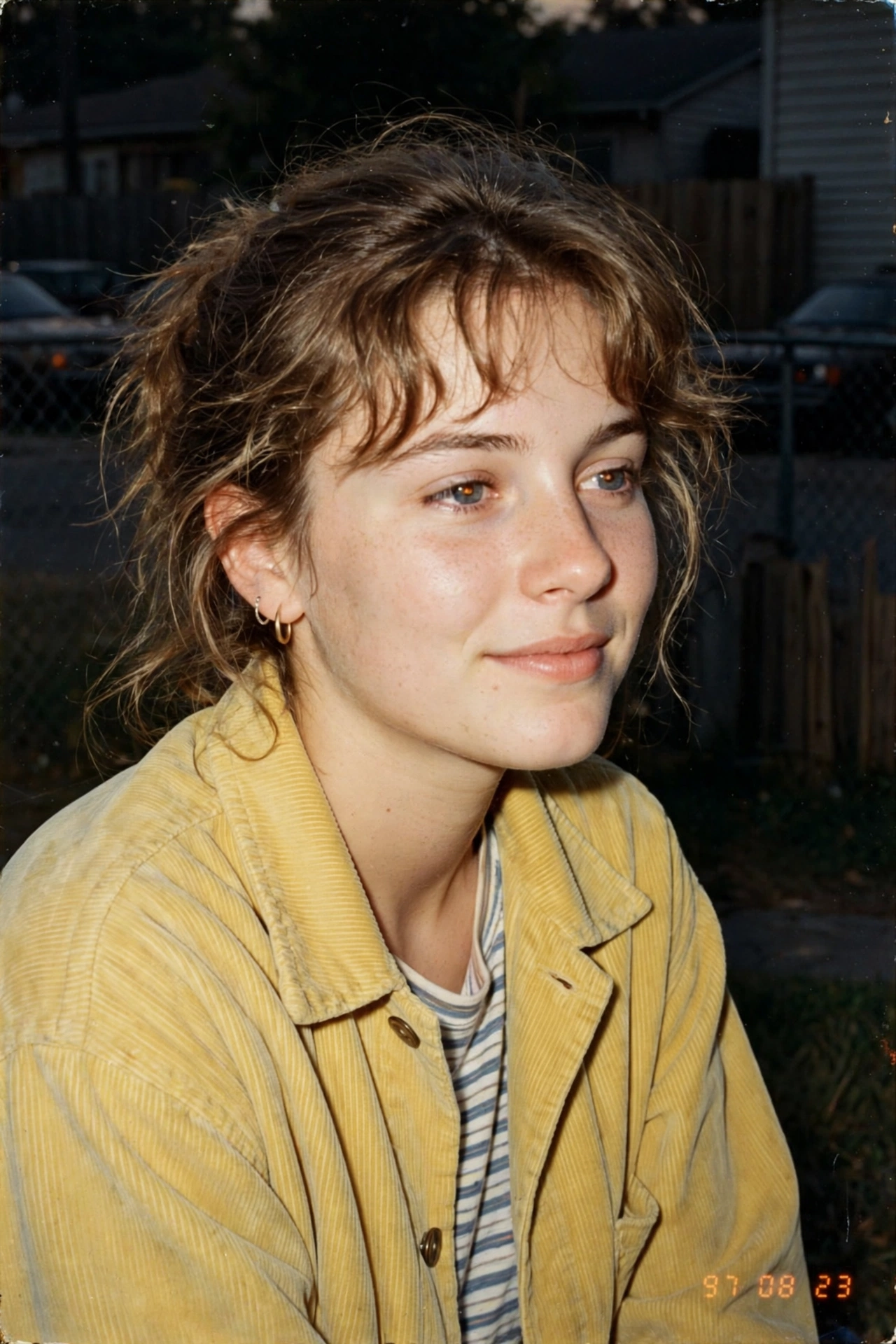
90s Film Camera Portrait
Edit the uploaded photo. Keep the face identical. Restyle into a 1990s film-camera portrait: warm grain, gentle on-camera flash, slightly faded colors, candid framing, authentic 90s point-and-shoot aesthetic, nostalgic and warm. Keep skin texture natural, no modern retouching look.Why it works: “no modern retouching look” protects the vintage illusion — one airbrushed patch of skin breaks the entire time-travel effect.
VHS Horror Still
Edit the uploaded photo. Keep the same face and identity exactly. Restyle into a 1990s VHS camcorder still from a found-footage horror movie: dim bedroom at night, harsh on-camera light, scan lines, chroma bleed, slight tracking distortion, washed-out colors, a faint shadowy figure lurking blurred in the background, timestamp overlay "PLAY 02:47 AM". Eerie and authentic.Why it works: the artifacts ARE the image — scan lines, tracking distortion, and the timestamp do more work than any costume or makeup could.
Polaroid Memory
Edit the uploaded photo. Keep the face clear and recognizable. Convert into a Polaroid-style memory: classic white border with slight tilt, faded colors, lifted blacks, soft vignette, subtle grain, warm tones — the unmistakable feel of a snapshot from a family album, 1980s. Genuine and unposed.Why it works: the tilt and border imperfections signal authenticity — perfectly straight would look digital, slightly crooked looks found.
Black-and-White Classic
Edit the uploaded photo. Keep the face exactly the same. Convert into a timeless black-and-white studio portrait: rich deep blacks, luminous highlights, dramatic side lighting sculpting the cheekbones, fine film grain, Ansel-Adams-grade tonal range, gallery-quality fine art photography, 4:5.Why it works: removing color forces the model to work with light alone — and dramatic side lighting is what separates a snapshot from a portrait.
70s Vintage Warmth
Edit the uploaded photo. Preserve the face identical. Restyle with a 1970s vintage treatment: faded warm colors, orange-teal cast, soft halation glow around highlights, gentle grain, slightly soft focus, sun-drenched nostalgic mood, like a rediscovered family slide. 4:5.Why it works: “like a rediscovered family slide” gives the model an emotional target, not just a technical one — it reaches for warmth, not just color values.
Professional Headshot Prompts
Corporate Headshot
Edit the uploaded photo. Keep the face exactly the same — identical features, natural expression. Transform into a crisp executive headshot: tailored navy blazer, clean neutral studio background, soft key light with gentle rim light, sharp focus on the eyes, confident approachable expression, professional corporate photography, high resolution, 4:5.Why it works: headshots are about subtraction — neutral background, soft light, and zero distractions keep all attention on the face, which is the entire point.
LinkedIn Portrait
Edit the uploaded photo. Preserve the face 100%. Create a polished LinkedIn-ready portrait: smart casual attire (blazer, no tie), bright airy office background softly blurred, natural window light, genuine subtle smile, approachable and competent mood, sharp professional quality, vertical 4:5.Why it works: “approachable and competent” is the exact LinkedIn brief — the prompt names the platform’s unspoken dress code so the result fits in.
Creative Professional
Edit the uploaded photo. Keep the face identical. Restyle into a creative-industry portrait: stylish textured blazer, artistic studio background with soft gradient, dramatic but flattering side light, confident creative expression, editorial photography aesthetic, shallow depth of field, ultra-detailed 4:5.Why it works: “editorial” unlocks a different register than “corporate” — same headshot function, but the styling says portfolio instead of boardroom.
Passport-Style Photo
Using the uploaded photo as the reference for facial identity, create a high-resolution print-ready passport photo. Preserve the person's facial features, face shape, skin tone, and identity accurately. Front-facing, neutral expression, eyes directly at the camera, plain light-blue background, even studio lighting, sharp and realistic, official ID photo standard.Why it works: passport photos are a spec sheet, not art — listing the requirements (front-facing, neutral, plain background) gets compliance instead of creativity.
Festival & Occasion Prompts
Diwali Celebration Portrait
Edit the uploaded photo. Keep the face identical. Restyle into a radiant Diwali celebration portrait: the person in festive traditional attire (silk kurta or lehenga in deep red and gold), surrounded by glowing diyas and marigold garlands, fairy lights bokeh in the background, warm golden festive glow on the skin, joyful celebratory mood, ultra-detailed, 4:5.Why it works: Diwali is a festival of light, so the prompt leads with light sources (diyas, fairy lights, golden glow) — get the light right and the festival feeling follows.
Birthday Magazine Cover
Edit the uploaded photo. Keep the face exactly the same. Transform into a glossy magazine cover birthday portrait: bold headline text "HAPPY BIRTHDAY" at the top, gold confetti falling around, luxurious dark background with spotlight, elegant party attire, celebratory glamorous mood, high-fashion editorial style, ultra-detailed 4:5.Why it works: the text headline is what makes it a “cover” instead of a portrait — and Nano Banana’s improved text rendering (2.1) finally makes in-image text reliable.
Christmas Portrait
Edit the uploaded photo. Preserve the face identical. Restyle into a cozy Christmas portrait: the person in a festive deep-green outfit, sitting beside a beautifully decorated Christmas tree with warm glowing lights, soft snowfall visible through a window behind, warm fireplace glow on one side, magical holiday mood, cinematic and heartwarming, 4:5.Why it works: Christmas prompts work through layering — tree lights plus window snow plus fireplace glow stack three warm sources for maximum coziness.
Halloween Vampire
Edit the uploaded photo. Keep the same face, features, and expression exactly. Restyle into an elegant vampire Halloween portrait: deep burgundy velvet outfit with high lace collar, dark berry lips, subtle pale makeup, candlelit gothic interior, cool moonlight from an arched window, faint mist, carved pumpkins softly blurred behind, cinematic color grade, 4:5. Natural skin texture.Why it works: “elegant” is the key modifier — without it, vampire prompts drift toward horror-movie gore; with it, you get the costume-party version people actually want.
Eid Festive Portrait
Edit the uploaded photo. Keep the face identical. Restyle into an elegant Eid celebration portrait: the person in a sophisticated pastel kurta or embroidered abaya, standing in a beautiful mosque courtyard with intricate geometric architecture softly blurred behind, crescent moon in the twilight sky, warm lantern glow, serene festive dignity, cinematic portrait, ultra-detailed 4:5.Why it works: the architecture and moon do the cultural signaling — the prompt respects the occasion’s tone (serene, dignified) instead of defaulting to party mode.
New Year Party Look
Edit the uploaded photo. Preserve the face exactly. Restyle into a glamorous New Year celebration portrait: sparkling sequin outfit, holding a champagne glass, confetti and gold balloons blurred in the background, city fireworks bokeh through a window, radiant joyful energy, high-fashion party photography, ultra-detailed, 4:5.Why it works: New Year is maximalism — sequins plus champagne plus fireworks plus confetti is one of the few prompts where “more” is the correct instruction.
Photo Restoration Prompts
Restore an Old Damaged Photo
Edit the uploaded old photo. Restore it completely: remove scratches, dust, creases, and water damage; repair torn areas; sharpen soft details; correct fading. Keep every face and feature true to the original — no reinvented details. Preserve the original composition and era-accurate clothing. Natural, archival-quality restoration.Why it works: “no reinvented details” is the critical fence — restoration fails when the model invents a new face for a blurry relative, and this line forbids it.
Colorize a Black-and-White Photo
After restoring the uploaded photo, add realistic natural color: era-accurate skin tones, believable fabric colors, soft natural lighting. Keep it subtle and true to life, not oversaturated. Do not change any faces or features. The result should look like the photo was always in color.Why it works: “like it was always in color” sets the right target — restrained and believable beats vivid every time in colorization.
Sharpen a Blurry Photo
Edit the uploaded blurry photo. Enhance sharpness and clarity: recover facial details, sharpen edges, reduce motion blur and noise, restore natural skin texture. Keep the person's identity, expression, and all features exactly the same. Do not beautify or alter — only clarify. The result should look like the same photo taken with a better camera.Why it works: “only clarify, don’t beautify” draws the line between restoration and transformation — the two most common ways this edit goes wrong.
Anatomy of a Prompt That Works
Every prompt above follows the same skeleton. Learn it once and you’ll never need someone else’s prompt again.
The six elements
Strong prompts combine up to six elements: subject (who’s in the image), environment (where the scene happens), lighting (quality and direction of light), camera style (lens, framing, depth of field), mood (the feeling), and visual style (the aesthetic — film noir, Kodak grain, editorial). You don’t need all six every time. But when a prompt misfires, the fix is almost always a missing element, not a longer prompt.
The face-preservation rule
For any edit of a real photo, the identity line is non-negotiable: “keep the face exactly the same” or “preserve the original identity.” Without it, the model restyles the face along with everything else and hands you a stranger. This single line is the difference between the prompts that go viral and the ones that get deleted. It’s also why Gemini’s editor beat the competition — identity preservation through heavy restyling is its signature strength.
Lighting and camera keywords
If you learn nothing else, learn this: lighting words carry more weight than any other part of a prompt. “Golden hour,” “neon reflections,” “soft butterfly light,” “harsh direct flash” — each one is a complete visual program. Camera words come second: “85mm,” “shallow depth of field,” “4:5” tell the model how to frame, not just what to show. One precise lighting phrase beats three vague adjectives.
FAQs
Is Gemini’s image generation free?
Yes, with limits. The Gemini app includes image generation and editing for free users (around 100 image edits per day); paid tiers raise the ceiling substantially. You don’t need any separate app or subscription to use the prompts in this guide.
Why does Gemini change my face, and how do I stop it?
It happens when the prompt doesn’t fence off identity. Always include an explicit preservation line — “keep the face exactly the same” — near the start of the prompt. Gemini weights early instructions more heavily, so put it first, not last. Also upload a clear, front-facing source photo; the model can’t preserve what it can’t see.
What’s the difference between Gemini and Nano Banana?
Nano Banana is the nickname for the image model inside Gemini (officially the Gemini Flash Image line — currently Nano Banana 2.1). When people say “Gemini AI photo,” they mean Nano Banana’s editing engine. Every prompt here is written for it.
Can I use these generated photos commercially?
For personal and social use, yes. For commercial use (ads, client work, products), check Google’s current terms — AI-generated images carry SynthID watermarks identifying them as AI-made, and some platforms and clients have policies about that. When in doubt, disclose.
Do these prompts work on the Gemini mobile app?
Yes. The Gemini mobile app supports photo upload plus prompt editing exactly like the web version. Paste the prompt, attach your photo, generate. The 4:5 aspect ratio in these prompts is chosen specifically because it fits phone screens and Instagram.
Why do couple prompts sometimes merge faces?
Couple edits are the hardest job — the model must protect two identities at once. Include “preserve both identities, do not merge or alter features” explicitly. If faces still blend, try generating with a photo where both faces are clearly visible and well-lit, facing the camera.
What’s the best kind of photo to upload?
A clear, well-lit, front-facing photo. The model edits what you give it — a dark, blurry, or heavily filtered source photo gives it less to work with, and face preservation suffers first. Natural daylight selfies work better than nightclub shots.
Can I combine two prompts?
Yes — that’s where it gets fun. Take the subject framing from one (“keep the face exactly the same”) and the style from another (“Y2K flash aesthetic”). The identity line plus one style block is the minimum viable combo. Stack more than two styles and results get muddy.
The Bottom Line
The viral Gemini photo trend looks like magic, but it’s a formula: a clear source photo, an explicit face-preservation line, a named aesthetic, and one precise lighting phrase. That’s it. The forty prompts above are starting points — copy them as-is for instant results, or steal their skeleton and build your own.
The people getting the best results aren’t prompt engineers. They’re the ones who stopped describing everything vaguely and started naming one thing precisely. Pick your aesthetic, lock the face, light the scene. The rest takes care of itself.