Most businesses don’t have an AI problem. They have a repetition problem. The same lead gets copied into the same spreadsheet. The same inbox gets triaged by the same tired human at 9am. The same meeting notes die in the same Google Doc nobody reopens.
AI automation workflows fix exactly that. Not with a grand “AI strategy” — with small, repeatable systems where software handles the repetitive middle and humans keep the judgment calls. This guide shows you what these workflows actually are, twelve blueprints worth building first, which tool to build them on, and the guardrails that keep them from quietly breaking.
What Are AI Automation Workflows, Exactly?
An AI automation workflow is a repeatable process where some steps run on rules and software, and the steps involving messy, unstructured information get handled by AI. A new lead arrives → software creates the CRM record (rules) → AI reads the inquiry, figures out what the person actually wants, and drafts a reply (AI) → a human approves it before sending (judgment).
That middle step is the whole story. Traditional automation is excellent at “if this, then that.” It falls apart the moment “this” is a rambling email, a phone transcript, or a form field where someone typed “ASAP!!!” AI fills that gap: it reads, classifies, summarizes, drafts, and decides — inside a workflow that still runs on rails.
AI automation vs traditional workflow automation
Traditional workflow automation moves data between systems on fixed rules. New row in a spreadsheet → create a task → send a notification. It never misunderstands anything, because there’s nothing to understand.
AI automation earns its keep where rules can’t reach: the lead message that needs classifying, the support ticket that needs prioritizing, the call transcript that needs action items extracted. If every step of your process is already precise and predictable, you don’t need AI — classic automation is cheaper and more reliable. Add AI only where the input is ambiguous and the cost of getting it wrong is low enough to tolerate.
AI automation vs RPA
Robotic process automation (RPA) mimics human clicks: it opens the invoice app, copies the total, pastes it into accounting. It’s screen-scraping with a suit on. AI automation works at the data and meaning layer instead — it reads the invoice, understands which number is the total, and flags the one that doesn’t match the purchase order. RPA breaks when a button moves; AI workflows break when the meaning changes. Different failure modes, different tools, occasionally used together.
AI workflows vs AI agents — and why the line is blurring in 2026
Here’s the distinction that matters: a workflow is the orchestration — the map of steps, branches, and guardrails. An agent is the worker inside one or more of those steps — software that reasons, uses tools, and adapts instead of following a fixed path.
In 2026 the two are merging. The modern pattern is a deterministic workflow with agentic steps embedded in it: the workflow handles the rails (triggers, approvals, logging), and an agent handles the one step where judgment is needed (read this contract and flag unusual clauses). If you want to understand the agent side properly, I compared two of the most popular agent frameworks head-to-head — useful background before you decide which of your workflow steps deserve an agent and which just need a prompt.
The Anatomy of an AI Automation Workflow
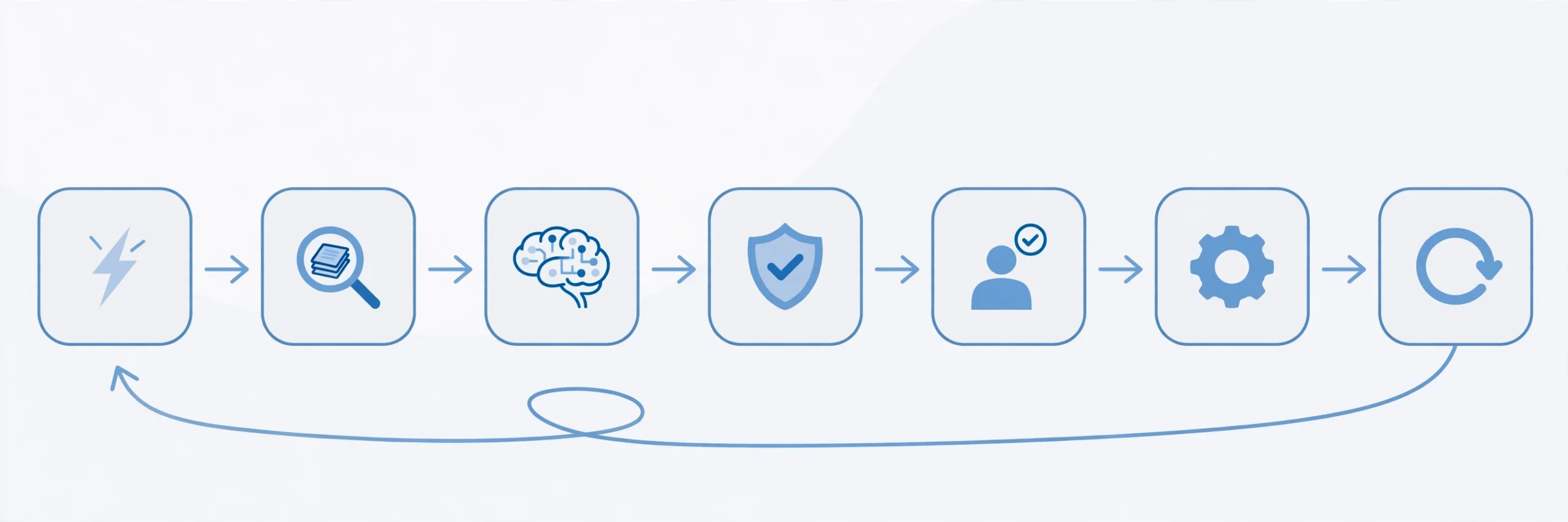
Strip any AI workflow down and you’ll find the same seven steps. Learn this pattern once and you can design — or debug — any workflow you’ll ever build:
- Trigger. Something happens: a form is submitted, a ticket arrives, a row changes, 9am hits.
- Context assembly. The workflow gathers what the AI step needs: CRM fields, order history, past emails, policy docs.
- AI step. Classify, extract, summarize, draft, decide, or recommend.
- Guardrails. Validate the output. Route by confidence: high-confidence → act, medium → draft for review, low → escalate.
- Human gate. A person approves, edits, or overrides wherever money, reputation, or legal exposure is involved.
- Action. Update the system of record, notify stakeholders, send the message.
- Monitoring. Log everything — inputs, AI outputs, decisions, outcomes — so you can measure and improve.
The unglamorous truth: steps 2, 4, and 7 decide whether your workflow survives contact with reality. Most failed automations don’t fail at the AI step. They fail because the AI never got the right context, nobody checked its output, or nobody noticed when it started drifting.
What the AI actually does inside
Forget the hype vocabulary. Inside workflows, AI does six jobs: classify (is this urgent?), extract (pull the dates and amounts from this document), summarize (turn this 40-message thread into three bullets), generate (draft the reply), decide (approve or escalate this refund), and recommend (suggest the next best action). Every blueprint below is some combination of these six. When someone pitches you “AI-powered workflow software,” ask which of the six it does — the answer tells you whether it’s a real tool or a chatbot with a pricing page.
The context layer: why workflows fail without it
An AI step is only as good as what it’s allowed to see. A support-triage workflow that can’t read past tickets will misroute. A quoting workflow that can’t see pricing history will hallucinate numbers. This is where most DIY automations quietly die: the builder wires up a slick trigger and a clever prompt, but the AI is reasoning from an empty room.
For workflows that need to pull answers from your documents, tickets, and wikis, you need a retrieval layer between your data and the model. Vector databases are the standard way to build that layer — they let the workflow find the three most relevant past cases instead of dumping your entire help center into a prompt. Get the context layer right and everything downstream gets smarter; skip it and you’re automating guesswork.
12 AI Automation Workflows Worth Building First
Each blueprint below follows the same anatomy: trigger → AI steps → tools → where the human stays. Start with one. Get it trusted. Then build the next.
1. Lead capture → qualify → route
Trigger: website form, email, DM, or phone call comes in.
AI steps: summarize the inquiry, classify the service type, score urgency from language (“today,” “emergency,” “just browsing”), draft a tailored confirmation.
Tools: n8n or Make + any CRM.
Human gate: a person reviews the routing before the first real reply goes out — at least for the first month. This is the highest-ROI workflow for most businesses because speed-to-lead decides deals. A prospect who waits four hours has already talked to your competitor.
2. Instant follow-up sequences
Trigger: quote sent, demo completed, or lead goes quiet for 48 hours.
AI steps: check deal status, pick the right follow-up angle from the quote type, draft a message that answers the likely objection instead of “just checking in.”
Tools: Make or Zapier + your CRM + email.
Human gate: approve the first few drafts per segment; then let it run with a weekly spot-check. The AI advantage here is specificity. “If you’re comparing options, the biggest difference is usually scope — this quote includes planning, QA, and post-launch fixes” beats a generic nudge every time.
3. Inbox triage + reply drafts
Trigger: new email arrives in a shared inbox.
AI steps: classify by topic and urgency, draft a reply from your knowledge base, flag anything sensitive for a human.
Tools: n8n + Gmail/Outlook + your docs.
Human gate: human sends. Always, at first. The workflow drafts; the person decides. Start with internal triage (sorting and prioritizing) before you let it draft customer-facing replies. Trust is built in that order.
4. Meeting notes → action items → assignments
Trigger: call ends / transcript lands.
AI steps: extract decisions, action items, owners, and deadlines; draft the follow-up summary; create tasks in your project tool.
Tools: Zapier or Make + Fireflies/Otter/Fathom + Asana/ClickUp.
Human gate: the meeting owner skims the summary before it goes to the team — AI still invents attendees occasionally. This one pays for itself in the first week. The alternative is action items living in someone’s memory until they’re forgotten.
5. Quotes and invoices → polite chasing
Trigger: quote approved or invoice overdue by X days.
AI steps: generate the quote/invoice from job details, detect overdue status, draft a chasing message matched to the relationship history (first nudge vs third).
Tools: Make + your accounting tool (Xero, QuickBooks) + email.
Human gate: approve anything that mentions money firmly. Polite-but-firm is a tone AI needs supervision on. Late payments are a cash-flow problem wearing a politeness problem’s clothes. Automate the remembering; keep a human on the tone.
6. Support ticket triage + resolution drafts
Trigger: new ticket, chat, or email arrives.
AI steps: classify issue type, urgency, and sentiment; pull similar past tickets and relevant help articles; draft a suggested response with troubleshooting steps.
Tools: n8n + Zendesk/Intercom/Freshdesk.
Human gate: auto-send only when confidence is high AND the issue is low-risk. Everything else goes to an agent with the draft attached. Route by confidence, not by optimism. A wrong auto-reply costs more trust than a slow correct one.
7. Content pipeline: idea → draft → schedule
Trigger: idea captured (form, voice note, Slack message).
AI steps: expand the idea into an outline, draft in your voice, generate platform variants (blog, LinkedIn, newsletter), schedule.
Tools: Make or n8n + Claude/ChatGPT + Buffer/Typefully.
Human gate: edit every draft before it publishes. AI drafts; humans publish. No exceptions worth making. Batch this weekly: one idea session becomes seven days of posts. The workflow removes the blank page, not the editor.
8. Reports from data you already have
Trigger: Monday 9am, or month-end.
AI steps: pull numbers from your systems, summarize what changed and why, draft the stakeholder-ready report with charts described in text.
Tools: n8n + Google Sheets/Airtable + your data sources.
Human gate: review the numbers before they go to anyone who makes decisions from them. AI is confident about arithmetic it got wrong. For longer analytical reports, agentic tools that research and write end-to-end are worth knowing — I tested how Manus’s different analysis modes handle report writing if you’re curious where that category stands.
9. Review requests after completed work
Trigger: project or job marked complete.
AI steps: wait 1–3 days, personalize the request with project details (“thanks for trusting us with the launch”), send the correct review link, send one reminder, route unhappy replies to a human instead of a review form.
Tools: Zapier or Make + your CRM + email/SMS.
Human gate: none needed after setup — but cap it at one reminder. Two reminders is spam with extra steps. Reviews compound. This is the simplest workflow on the list and one of the highest-value for local and service businesses.
10. Data sync between systems (kill the re-typing)
Trigger: record created or updated in system A.
AI steps: extract and normalize the fields, match to the right record in system B, flag conflicts instead of overwriting.
Tools: Make or n8n + your two systems’ APIs.
Human gate: review conflicts. Never let automation silently overwrite — that’s how you get two “final” versions of everything. This is pure traditional automation most of the time; AI earns its place only in the matching step, where names and formats don’t quite line up.
11. Employee onboarding
Trigger: HR creates a new hire record.
AI steps: translate role + region into required access bundles, check policy differences (labor rules, security constraints), draft the personalized first-week plan and welcome comms.
Tools: n8n + HRIS (BambooHR, Workday) + IT ticketing.
Human gate: approve elevated permissions. Everything else can run. Onboarding is a workflow everyone agrees is broken and nobody fixes. Automating the provisioning half alone usually cuts time-to-productivity by days.
12. Social scheduling + repurposing
Trigger: new blog post published or weekly slot hits.
AI steps: extract key points, rewrite per platform (hook for X, carousel outline for LinkedIn, script for short video), schedule at optimal times.
Tools: Make + Buffer/Hypefury + your CMS.
Human gate: skim the rewrites. Platform-native tone is where AI still sounds like AI. One long-form piece becomes a week of distribution. The workflow doesn’t make your content better — it makes your good content travel further.
n8n vs Make vs Zapier: Picking Your Builder
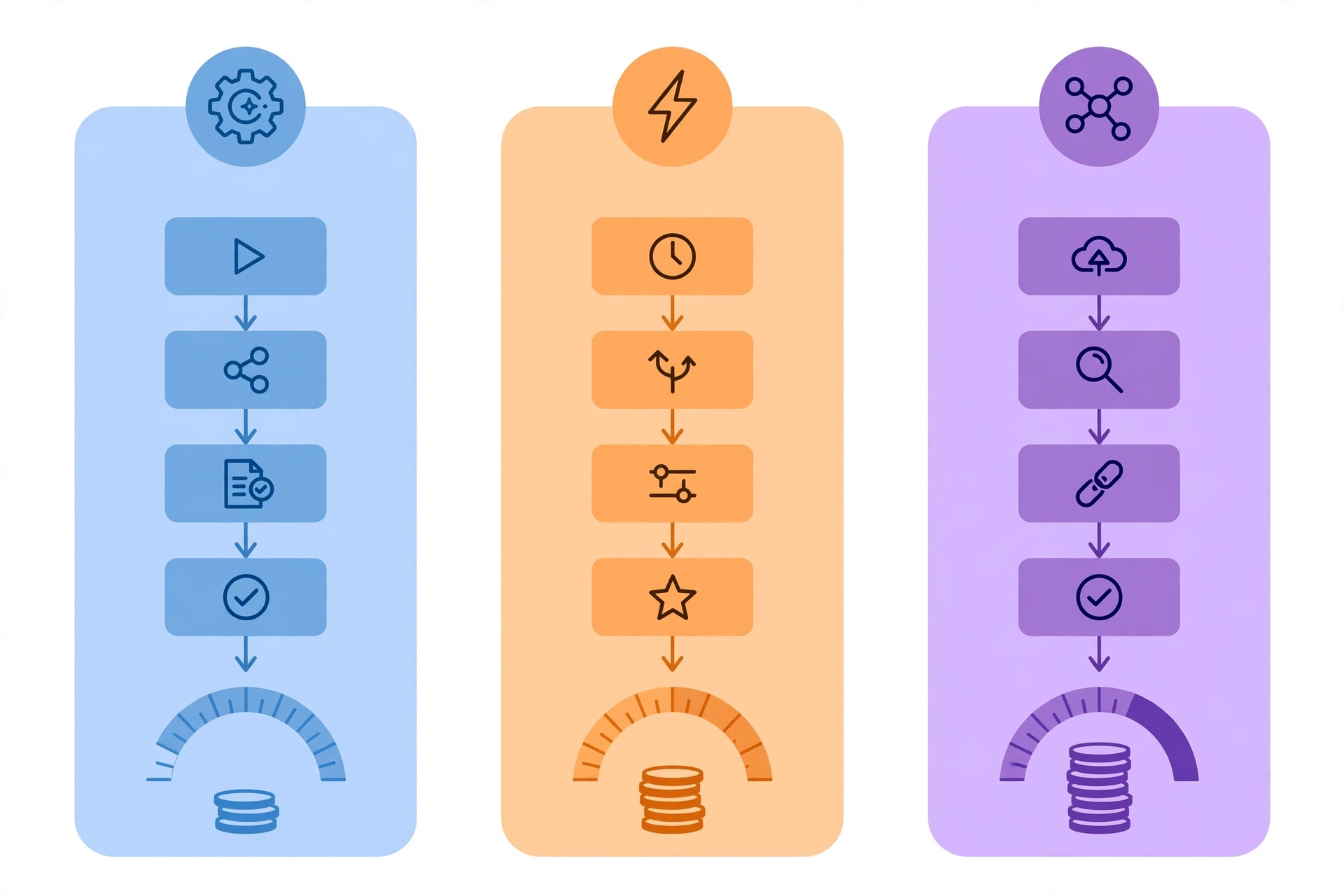
You can build every blueprint above on any of the three big platforms. The tool matters less than the workflow — but the billing model matters a lot, because each one charges you for something different.
| n8n | Make | Zapier | |
|---|---|---|---|
| You pay for | Executions (one full workflow run = 1, however many steps) | Credits (each module that runs = 1) | Tasks (each action step = 1) |
| Free tier | Self-hosted: free, unlimited | 1,000 credits/month | 100 tasks/month, 2-step Zaps |
| Entry paid | Cloud Starter ~€24/mo (2,500 executions) | Core $9/mo annual (10,000 credits) | Professional $19.99/mo annual (750 tasks) |
| Mid tier | Cloud Pro ~€60/mo (10,000 executions) | Pro $16/mo annual (10,000 credits) | Team $69/mo annual (2,000 tasks) |
| Self-hosting | Yes — full control, data stays yours | No | No |
| Learning curve | Steepest, rewards technical users | Middle — visual, powerful | Gentlest — anyone can start |
| AI fit | Native AI agent nodes, code nodes | Strong AI modules, visual routing | Basic AI actions, simplest setup |
| App library | 400+ nodes + HTTP for anything | 2,000+ apps | 7,000+ apps (biggest) |
(Prices as published in 2026; annual billing is cheaper on all three, and n8n lists in euros. Always confirm on the vendor’s pricing page before buying.)
The billing unit is the real decision. A 10-step workflow running 1,000 times a month costs n8n 1,000 executions, Make roughly 10,000 credits, and Zapier roughly 9,000–10,000 tasks. Same automation, wildly different bills. The longer and more complex your workflows get, the more n8n’s per-run pricing wins — and Make sits in the sweet spot for non-technical builders who want visual power without Zapier’s per-step meter running.
When each one wins
Pick n8n if you’re technical, want to self-host, run long multi-step workflows, or need AI agents as native workflow steps. The self-hosted Community edition is genuinely free — you pay only for a small server — and n8n’s official docs walk through self-hosting setup in detail.
Pick Make if you want the best power-to-simplicity ratio. The visual builder handles branching logic beautifully, the free tier is usable, and $9/month buys real capacity. This is the default recommendation for most small businesses.
Pick Zapier if you need the widest app coverage, the gentlest learning curve, or your team will never touch anything technical. You’ll pay more at scale — budget for it with eyes open.
Governance: The Guardrails Nobody Talks About
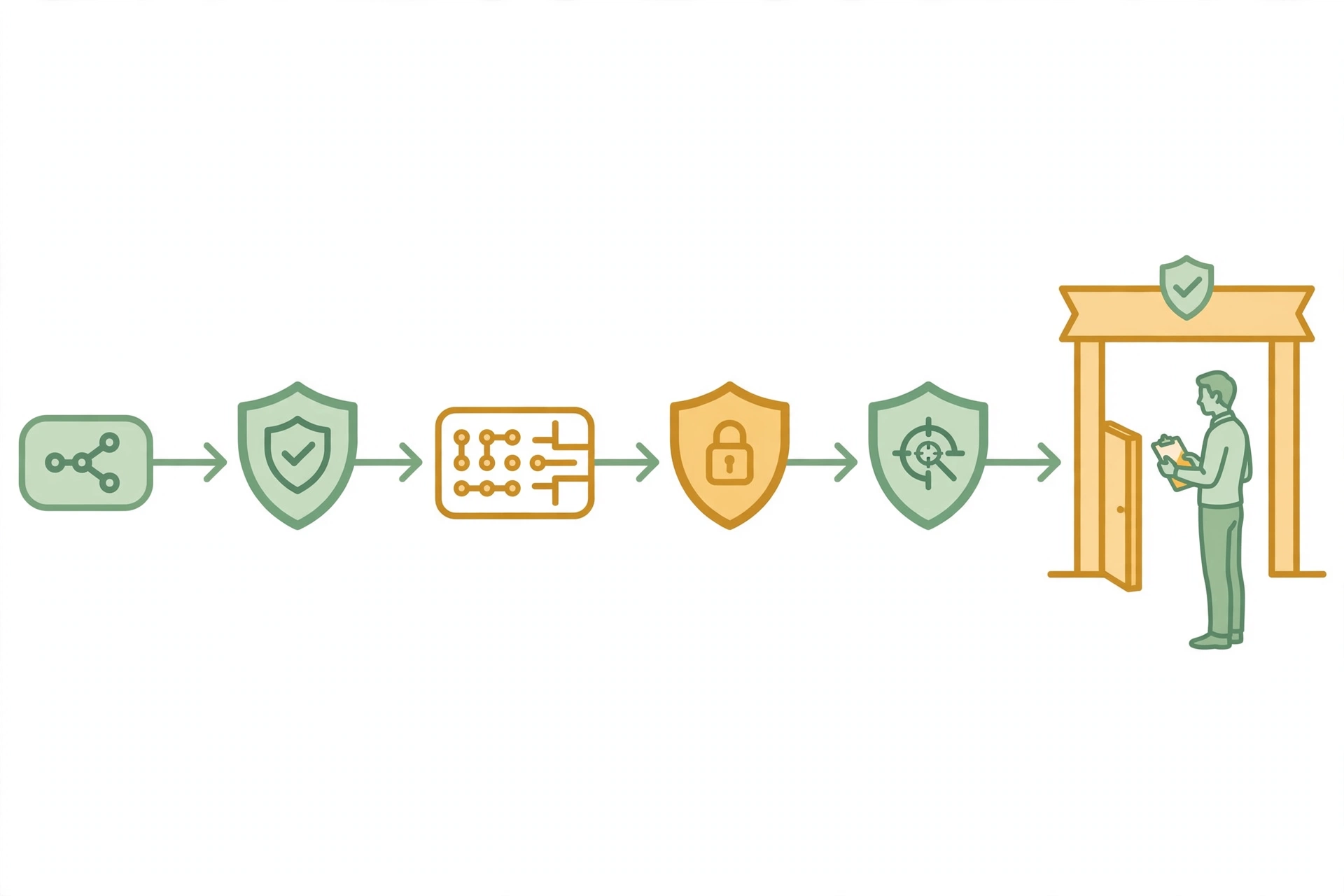
Every workflow guide tells you what to automate. Almost none tell you how to keep it from causing damage. As your workflows touch customer data, money, and external messages, three guardrails stop being optional.
Data access and least privilege
Give each workflow access to exactly the data its job needs — nothing more. The quoting workflow doesn’t need your HR records. The support triage doesn’t need payroll. When a workflow only touches what it must, a prompt-injection attempt or a misconfigured step has a small blast radius instead of a company-wide one.
Human approval gates for irreversible actions
Draw a hard line: anything that sends money, sends external messages, deletes records, or changes permissions waits for a human. Drafts, summaries, classifications, and internal updates can run free. This single rule prevents nearly every automation horror story — nobody ever regretted a workflow that asked first.
Logging everything for audit and debugging
Log inputs, AI outputs, decisions, and outcomes for every run. This isn’t bureaucracy; it’s how you debug (“why did it send that?”), how you prove compliance, and how you improve (the logs show exactly where the workflow hesitates). If your platform choice comes down to logging quality, pick the better logs.
What Breaks: 6 Ways AI Workflows Fail
- Silent failures. The workflow errors at 2am, nobody notices, leads pile up unanswered for three days. Fix: alert on every failure, and alert differently (SMS, not email) when the failure is in a revenue-adjacent workflow.
- Prompt drift. The model gets updated, your carefully tuned prompt behaves differently, outputs quietly degrade. Fix: version your prompts and re-check outputs after any model change.
- Context rot. The knowledge base the workflow reads from goes stale; the AI keeps answering from last year’s pricing. Fix: put an owner and a review date on every source the workflow reads.
- Over-automation. Automating the apology email after you automate the mistake that caused it. Fix: if a workflow’s error rate needs another workflow to clean up, the first workflow is the problem.
- Tool sprawl. Five workflows on Zapier, three on Make, two scripts somewhere — nobody knows what runs where. Fix: one primary platform per company, documented in one place.
- No owner. The person who built it left; it runs until it doesn’t. Fix: every workflow gets a named owner and a quarterly review date. No owner, no workflow.
The ROI Math: Proving It’s Worth It
Monthly value = (hours saved per run × runs per month × fully-loaded hourly cost) − platform cost
Worked example — the meeting-notes workflow:
- 10 meetings/week × 20 minutes of note-processing each = ~13 hours/month
- At a $50/hour fully-loaded cost: $650/month in recovered time
- Platform cost (Make Core): $9/month
- Net: ~$640/month from one workflow, before counting fewer dropped action items
Run this math before building, not after. If the number is small, pick a different workflow — the scorecard from earlier (frequency × time saved × revenue impact, divided by risk) tells you which one.
Your First 90 Days
Days 1–30: map and build one. Document your most repetitive workflow on paper. Build the smallest automated version. Run it with a human approving every output. Log everything.
Days 31–60: measure and add one more. Check the logs: is it saving the time you predicted? Fix what the logs show. Build workflow number two — pick one adjacent to the first so they share context and tools.
Days 61–90: expand carefully. Now you have evidence, not hope. Add the next two workflows, tighten the guardrails that the logs say you need, and assign every workflow a named owner.
Resist the urge to automate five things in week one. One trusted workflow teaches you more about your business than five half-built ones.
FAQs
What is AI automation?
AI automation is the use of artificial intelligence inside automated workflows to handle steps involving unstructured information — reading emails, classifying requests, drafting replies, extracting data from documents — while software handles the deterministic steps around it.
What’s the difference between AI automation and workflow automation?
Workflow automation moves work through fixed steps on rules (“if this, then that”). AI automation adds AI steps for the parts rules can’t handle: understanding messy inputs, making judgment calls, and generating content. Most real systems are hybrids.
Do I need to know how to code to build AI automation workflows?
No — not to start. Make and Zapier are visual builders; you can ship real workflows without writing code. n8n rewards coding skills but doesn’t require them. Code becomes useful when you outgrow the visual blocks, not before.
How much does it cost to start?
Practically nothing. Make’s free tier (1,000 credits/month) and n8n’s self-hosted Community edition ($0 plus a small server) both run real workflows. Most small businesses land on $9–$25/month once they’re running several workflows. The AI model calls themselves cost cents per thousand runs at typical volumes.
n8n vs Make: which should I pick first?
Pick Make if you want the gentlest path to powerful workflows; pick n8n if you’re technical and want the cheapest long-term cost, especially self-hosted. Either beats starting on Zapier for AI-heavy workflows, where per-step billing punishes the multi-step patterns AI needs.
Will AI workflows replace employees?
They replace tasks, not people — specifically the repetitive middle of jobs: copying, triaging, summarizing, chasing. The pattern that works is consistent: automate the repetitive 70%, keep humans on the judgment-heavy 30%, and let people spend the recovered time on work that actually needs them.
How do I keep AI from making mistakes in my workflows?
Three guardrails: route by confidence (act on high, draft on medium, escalate on low), require human approval for anything irreversible, and log every run so you can spot drift. No workflow should be fully autonomous on day one — autonomy is earned through logged evidence, not granted at setup.
The Bottom Line
The businesses winning with AI in 2026 aren’t the ones with the grandest AI strategies. They’re the ones that picked one boring, repetitive workflow — lead intake, meeting notes, invoice chasing — and made it run itself, with guardrails.
Workflows are the exoskeleton; agents are the muscle. Build the exoskeleton first: the triggers, the context, the human gates, the logs. Then put intelligence inside it, one step at a time. Start small, measure honestly, and let the boring workflows compound.