
Visual discovery has completely transformed how we interact with the web. Gone are the days when finding a photo online meant relying solely on exact keyword strings.
Today, advanced search engines utilize cutting-edge computer vision and neural networks to parse visual data. They analyze pixels, shapes, colors, and spatial layouts instantly.
As a result, users can bypass traditional text limitations. Whether you are tracking down product sources, authenticating digital media, or optimizing your own site, understanding these evolving search mechanisms is more critical than ever.
Why Image Search Techniques Matter in 2026
The digital landscape in 2026 relies heavily on visual data. Traditional text-only queries no longer satisfy the speed and precision demanded by modern web users.
People want instant answers. Pointing a phone camera at an object or uploading a screenshot has become the default way to shop, learn, and explore.
For creators and marketers, mastering these visual search methods is essential. Staying ahead ensures your digital assets remain discoverable as search engines shift toward multimodal AI.
| Feature / Metric | Traditional Text Search | Modern Image Search (2026) |
| Primary Input | Text keywords and strings | Pixels, screenshots, objects, and photos |
| Underlying Tech | Keyword indexing & metadata | Computer vision & neural embeddings |
| Speed to Result | Dependent on precise wording | Instant recognition via visual cues |
| User Intent | Informational or navigational | E-commerce, identification, and verification |
How Search Engines Actually Read Images
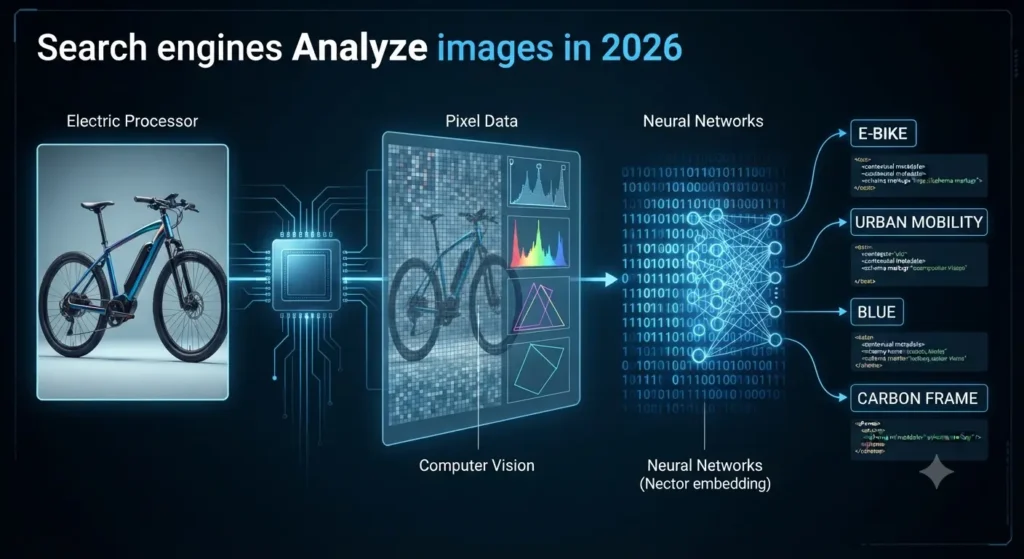
Search engines cannot “see” an image the way a human does. Behind every visual query is heavy computational processing that translates pixels into structured data.
First, computer vision algorithms scan the file for fundamental components. They isolate shapes, map dominant color histograms, detect sharp edges, and analyze spatial layouts.
Next, neural networks convert these visual elements into numerical vectors known as embeddings. This process maps the semantic meaning of the image into a high-dimensional space.
Finally, engines cross-reference those visual embeddings with contextual signals. They read surrounding text, file names, captions, and alt attributes to confirm what the image actually represents.
Core Components of Visual Processing
- Pixel & Color Analysis: Breaking down dominant hues and gradients to categorize aesthetic patterns.
- Feature Extraction: Identifying distinct object boundaries, text, and geometric structures within the frame.
- Vector Embeddings: Translating visual features into mathematical coordinates for fast database matching.
- Contextual Association: Merging on-page text signals to validate the accuracy of the visual match.
The Core Image Search Techniques
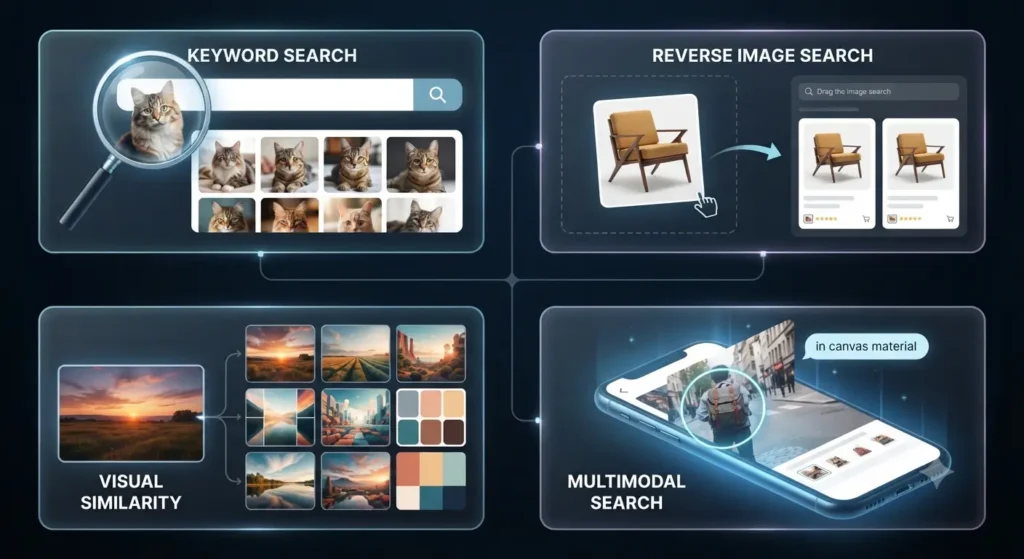
Navigating visual web data requires more than just a single approach. Different search intents call for distinct methodologies, ranging from simple keyword queries to advanced machine-learning lookups.
Here are the primary techniques used by modern search engines and power users to retrieve, analyze, and match images online:
- Keyword-Based Visual Discovery: The foundational method where users input descriptive text queries into an image engine to retrieve relevant illustrations, photographs, and graphics.
- Reverse Image Search: Uploading an existing image file or pasting a URL to trace its original source, track unauthorized usage, and locate higher-resolution versions across the web.
- Visual Similarity & Style Matching: Utilizing algorithms to scan composition, color palettes, and aesthetic patterns to find visually related items, design layouts, or decor inspirations.
- Multimodal and AI-Powered Queries: Blending text prompts with visual elements simultaneously—such as circling an object in a screenshot and typing a question—to execute complex, highly specific searches.
Summary of Image Search Techniques
| Technique | Primary Input | Best Use Case |
| Keyword Search | Text strings | Finding general stock photos or illustrations |
| Reverse Search | Image file or URL | Tracing copyright, ownership, and original sources |
| Similarity Search | Photo or screenshot | Discovering matching fashion, products, or aesthetics |
| Multimodal Query | Image + text prompt | Asking complex contextual questions about a specific object |
Best Image Search Tools: Comparison Table
Finding the right visual result or tracing an image source depends heavily on using the right tool for the job. Different search engines and utilities specialize in distinct matching algorithms, ranging from massive general databases to specialized mobile lookups.
Here is a comprehensive breakdown of the top image search tools available in 2026, comparing their core strengths, primary use cases, and platform compatibility:
| Tool Name | Primary Specialization | Best Use Case | Platform Availability |
| Google Lens | Object recognition & multimodal queries | General identification, shopping, and text translation | Mobile App, Web, Android/iOS integration |
| TinEye | Exact reverse image matching | Tracking copyright, image origins, and historical edits | Web Browser |
| Bing Visual Search | Structured visual matches & cropped elements | Finding visually similar products and alternative web photos | Web, Microsoft Edge, Mobile App |
| Yandex Images | Facial recognition & alternative web indexing | Locating obscure web images and alternative angles | Web Browser, Mobile App |
| Pinterest Lens | Fashion, decor, and aesthetic inspiration | Discovering mood boards, recipes, and lifestyle products | Mobile App, Web |
| Labnol Reverse Search | Fast, mobile-friendly web lookups | Quick reverse image queries without heavy app installations | Web Browser (Digital Inspiration) |
Key Takeaways for Tool Selection
- For General Versatility: Google Lens remains the undisputed leader for everyday object recognition and mixed text-image queries.
- For Copyright & Provenance: TinEye excels at finding exact file matches across the web even if the image has been cropped or resized.
- For Niche Discovery: Platforms like Pinterest and Yandex offer unique visual indexing strengths that often outperform mainstream Western search engines for specific regional or style-based queries.
Google’s Image Search Surfaces
Google has evolved far beyond a single browser tab for finding images. Today, visual discovery is integrated across multiple dedicated surfaces, each tailored for different user behaviors and search intents.
Understanding where and how these surfaces operate helps you find what you need faster or optimize your own digital assets for maximum visibility.
Overview of Google’s Visual Search Ecosystem
- Google Images: The traditional web-based index allowing users to filter results by size, color, type, time, and usage rights.
- Google Lens: An AI-powered tool built into mobile devices and browsers that analyzes live camera feeds, screenshots, and saved photos to extract text, identify objects, and find matching products.
- Circle to Search: A gesture-based feature on modern mobile devices that lets users highlight anything on their screen—whether in a video, game, or social app—to trigger an instant visual search.
- Multisearch: A feature allowing users to combine an image with text queries (e.g., uploading a photo of a shirt and typing a specific color) to refine search results.
- Google Discover: A personalized mobile feed that surfaces visual content and articles based on user interests, driving substantial organic traffic to optimized web pages.
| Surface | Primary Input Method | Best User Intent |
| Google Images | Text keywords & filters | Broad web research & stock media discovery |
| Google Lens | Camera, screenshot, or image file | Real-world object recognition & quick identification |
| Circle to Search | Screen gesture (long-press/circle) | Instant contextual lookups without switching apps |
| Multisearch | Image + text refinement | Complex shopping or item-specific queries |
| Google Discover | Automated algorithm / AI feed | Passive content consumption & inspiration |
Advanced Reverse Image Search Tactics
Executing a standard reverse lookup is straightforward, but finding elusive web assets, tracking unauthorized copies, or isolating obscure details requires advanced strategies. Professional researchers and digital creators employ specific tactics to maximize their search success.
Here are the most effective methods to elevate your reverse image search workflow:
- Bypass Indexing Blind Spots with Multi-Engine Cross-Checking: No single search engine indexes the entire web. If Google or Bing fails to return a match, cross-referencing the image on specialized engines like TinEye or Yandex often uncovers hidden results.
- Crop and Isolate Key Elements: Complex backgrounds can confuse visual search algorithms. Cropping out distracting elements to focus tightly on a specific logo, product, or subject dramatically improves matching accuracy.
- Leverage Specialized Web Utilities for Mobile: When conducting lookups on mobile devices where heavy desktop tools or native apps are inconvenient, lightweight web-based utilities—such as Labnol Reverse Image Search (Digital Inspiration)—provide fast, seamless queries directly from your mobile browser
- Inspect Image Metadata and EXIF Data: Before running a visual lookup, check the file’s underlying metadata. Original creation dates, camera models, and author tags embedded in the file often provide immediate context that bypasses the need for a search engine entirely.
Advanced Tactic Summary
| Tactic | Action Step | Primary Benefit |
| Multi-Engine Search | Test across Google, TinEye, and Yandex | Overcomes individual crawler limitations |
| Element Isolation | Crop image to focus on a single object | Removes background noise for precise matches |
| Mobile Web Utilities | Use browser-based tools like Labnol | Enables fast lookups without app installations |
| Metadata Inspection | Check EXIF data and file properties | Exposes hidden authorship and device details |
The IMAGE SEO Framework: 6-Step Optimization System
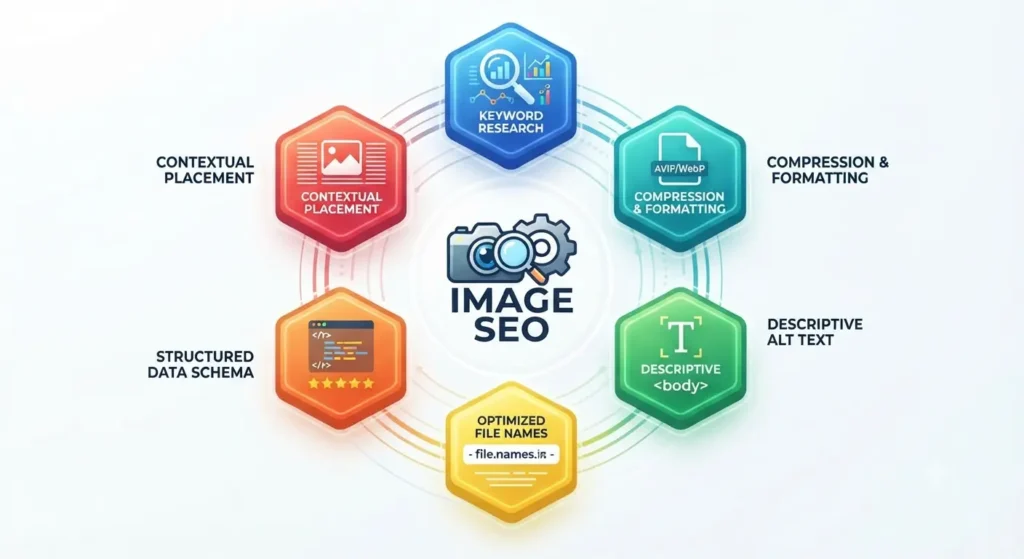
Ranking your visual assets in modern search results requires a structured approach that goes beyond simply uploading a photo. Implementing a repeatable optimization framework ensures search engine crawlers can properly index, understand, and serve your images to the right audience.
Here is the 6-step framework to maximize your visual content’s organic search performance:
- Conduct Intent-Driven Keyword Research: Identify what terms and visual queries your target audience uses, integrating LSI and secondary keywords naturally into your file naming and surrounding copy.
- Compress and Format for Speed: Convert heavy RAW files into next-gen formats like WebP or AVIF to drastically reduce page load times without sacrificing visual fidelity.
- Write Descriptive, Contextual Alt Text: Craft concise alternative text that accurately describes the image’s content while serving screen readers and search crawlers alike.
- Optimize File Names: Differentiate your assets from generic strings (e.g.,
IMG_1048.jpg) by using clean, hyphenated, and keyword-rich file titles. - Implement Structured Data Markup: Add JSON-LD image schema to give search engines explicit data regarding licensing, creator details, and caption context.
- Integrate into a Logical Silo: Place images directly within contextually relevant paragraphs and XML sitemaps to signal topical authority and strong internal linking structures.
The 6-Step Framework At-A-Glance
| Step | Action Item | Primary Objective |
| 1. Keyword Alignment | Research LSI and target search terms | Match user intent and visual discovery habits |
| 2. Performance Optimization | Compress to WebP/AVIF formats | Boost page speed and Core Web Vitals scores |
| 3. Alt Text Crafting | Write clear, descriptive text | Assist accessibility and crawler comprehension |
| 4. File Naming | Use hyphenated, keyword-rich names | Provide immediate file context to web crawlers |
| 5. Schema Integration | Implement JSON-LD structured data | Qualify for rich results and secure image attribution |
| 6. Contextual Placement | Embed within logical page silos | Enhance topical authority and internal linking signals |
Technical Image SEO & Optimization
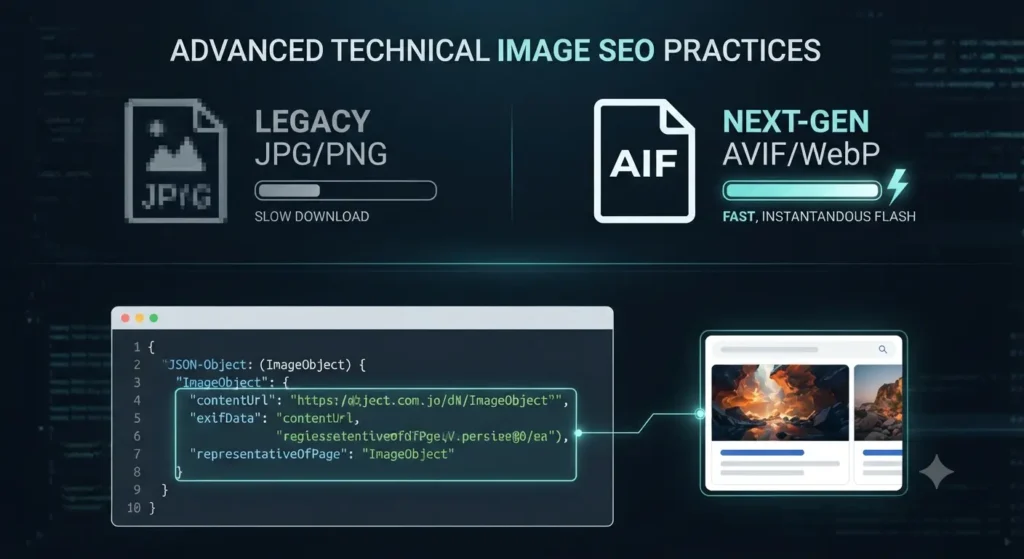
Ensuring your visual assets are discoverable goes beyond just file names and alt text. In 2026, technical image SEO requires a backend approach that communicates directly with search engine crawlers.
By structuring your data, providing explicit XML maps, and serving ultra-fast file formats, you secure a significant advantage in organic visual search rankings.
Here is a breakdown of the core technical implementations you need to apply to your website infrastructure.
1. Structured Data & Image Schema
Search engines rely on structured data to understand the precise context of an image. Implementing JSON-LD Schema Markup translates your visual content into machine-readable semantics.
Instead of guessing what an image is, schema explicitly tells Google if the photo represents a product, an author, or a recipe. This dramatically increases your chances of appearing in rich results and specialized visual feeds.
- Product Schema: Connects an image directly to pricing, availability, and reviews.
- ImageObject Schema: Embeds licensing details, creator attribution, and copyright notices directly into the search results.
2. Image Sitemaps for Rapid Discovery
While search engines typically discover images by crawling HTML pages, this method isn’t flawless—especially for large sites or those heavily reliant on JavaScript.
An Image XML Sitemap acts as a direct discovery shortcut. It consolidates all your visual assets into a single list, ensuring that hard-to-reach images are crawled and indexed efficiently. You can either embed image tags within your primary XML sitemap or create a dedicated image sitemap for larger, media-heavy domains.
Basic XML Image Sitemap Structure:
XML
<url>
  <loc>https://example.com/sample-page.html</loc>
  <image:image>
    <image:loc>https://example.com/image.jpg</image:loc>
    <image:title>Clear Description of Image</image:title>
  </image:image>
</url>
3. Image Format & Performance Comparison
Page speed remains a critical ranking factor, and heavy images are the number one cause of slow load times. Balancing high-resolution visual quality with aggressive compression is essential for modern SEO.
Transitioning to next-generation formats ensures your pages pass Core Web Vitals assessments while maintaining crisp visual fidelity for users conducting image searches.
| Format | Primary Benefit | Best Use Case in 2026 |
| AVIF | Superior compression and quality retention | The modern gold standard for general web imagery |
| WebP | Excellent balance of file size and broad browser support | Standard photographs and complex web graphics |
| PNG | Lossless quality and transparency | Logos, icons, and graphics requiring transparent backgrounds |
| JPEG | Universal compatibility | Fallback formatting for older legacy systems |
Image Search E-Commerce and Local Businesses
Visual search has evolved into one of the most powerful conversion drivers for both online storefronts and brick-and-mortar businesses. Consumers no longer rely solely on text queries to find what they want to buy; instead, they snap a photo of an item on the street, in a magazine, or on social media to purchase it instantly.
Optimizing your visual assets for e-commerce and local discovery ensures your products and storefronts capture high-intent traffic right at the moment of purchase decision.
E-Commerce Visual Search Optimization
- Multi-Angle Product Shots: Provide high-resolution, clean-background photographs from various angles to help visual search algorithms match patterns and textures accurately.
- Structured Product Markup: Embed rich product schema (including pricing, availability, and brand attributes) so your items appear directly in visual shopping carousels.
- Lifestyle and Contextual Imagery: Feature products in real-world environments to trigger visual similarity and style-matching queries from lifestyle-driven searches.
Local Business Visual Discovery
- Geo-Tagged Storefronts: Ensure your local establishment photos are geotagged and properly linked to your business profiles to capture regional visual queries.
- Menu and Product Catalog Indexing: Restaurants, salons, and local service providers benefit from uploading clearly named photos of their physical location, menu items, or work portfolios.
- Google Business Profile Integration: Regularly update your local profile with fresh, high-quality images to rank higher in localized map-based visual searches.
E-Commerce vs. Local Business Visual Strategy
| Strategy Focus | Primary Objective | Key Implementation |
| E-Commerce | Drive direct digital sales via visual shopping engines | Product schema, white-background cuts, and lifestyle shots |
| Local Businesses | Attract foot traffic and regional inquiries | Geotagged storefront photos, active profile updates, and service catalogs |
Avoiding Visual Duplication and Cannibalization
Publishing multiple identical or nearly identical images across different pages of your website might seem harmless, but it can severely harm your organic performance. When search engines crawl duplicate visual assets without clear canonical signals, it creates internal competition—known as image cannibalization.
Instead of boosting your overall reach, competing pages split your ranking equity. Search engines struggle to determine which specific URL deserves the primary ranking, often resulting in suppressed visibility for all competing pages.
Best Practices to Prevent Image Cannibalization
- Audit Your Visual Library Regularly: Conduct routine content audits to identify duplicate or redundant image files across your site’s directory.
- Consolidate and Redirect: Merge duplicate pages or remove redundant image assets, utilizing proper 301 redirects to funnel ranking authority to a single canonical asset.
- Use Unique, Contextual Variations: Ensure every image asset is uniquely tailored to its specific page context through distinct cropping, custom alt text, and relevant surrounding copy.
- Leverage Canonical Tags: Implement explicit canonical links for media-heavy pages to guide search engine crawlers toward the primary source file.
Cannibalization Impact Summary
| Issue | Root Cause | Negative SEO Impact | Resolution Strategy |
| Asset Duplication | Re-uploading the exact same graphic across multiple pages | Splits ranking signals and confuses crawlers | Consolidate files and use unified URLs |
| Keyword Cannibalization | Using identical alt text and file names for distinct products | Forces internal pages to compete against each other | Diversify descriptions and target distinct LSI terms |
| Unoptimized Directories | Cluttered media libraries with unorganized uploads | Slows down crawl efficiency and indexing speed | Routine asset audits and clean folder structures |
The Future of Image Search
Visual search technology is advancing at an unprecedented pace. As artificial intelligence and multimodal models continue to evolve in 2026, the boundaries between text-based queries and visual discovery are blurring entirely. Now, many AI image generation tools use AI to create highly realistic images for you in no time.
Search engines no longer rely solely on static tags or basic pixel matching. Instead, next-generation retrieval systems utilize real-time spatial computing, generative AI synthesis, and deep contextual neural networks to interpret visual queries instantly.
Looking ahead, optimization strategies must adapt to these emerging shifts to maintain organic visibility and capture high-intent digital traffic.
Emerging Trends in Visual Retrieval
- Real-Time Spatial Computing & AR: Integrating visual search directly into wearable augmented reality devices, allowing users to query physical environments seamlessly.
- Generative AI Search Integration: AI chat interfaces generating custom visual explanations and interactive diagrams on demand rather than pulling static web links.
- Advanced Cross-Modal Discovery: The seamless blending of voice commands, video streams, and live object captures into a single, unified search session.
| Trend / Technology | Core Mechanism | Impact on Search & SEO |
| Spatial Computing | AR device integration & live environment mapping | Shifts visual discovery from flat screens to physical spaces |
| Generative Visuals | AI-synthesized diagrams and custom media | Reduces reliance on traditional stock images and basic web queries |
| Multimodal Real-Time Streams | Continuous video and voice-to-image processing | Demands highly structured, real-time indexable digital assets |
Frequently Asked Questions
Navigating the complexities of visual search optimization, reverse lookups, and technical implementation often raises specific technical questions. Here are clear, actionable answers to the most common inquiries regarding image search in 2026.
How do search engines index images without proper alt text?
Modern search engines rely on advanced computer vision, pixel analysis, OCR (optical character recognition) to read embedded text, and contextual surrounding copy to deduce an image’s meaning even if alt text is missing. However, relying on this is not a best practice for SEO.
What is the best image format for SEO and performance in 2026?
AVIF and WebP are the industry standards. They offer superior compression rates and high visual fidelity compared to older legacy formats like JPEG and PNG, directly improving Core Web Vitals and page load speeds.
Can reverse image search engines find images that have been heavily edited or cropped?
Yes. Specialized engines like TinEye and Google Lens use neural embeddings and feature extraction rather than simple pixel-to-pixel matching, allowing them to trace original sources even through heavy cropping, color adjustments, or resizing.
How can I prevent my product images from being stolen or uncredited?
Implementing robust JSON-LD image schema with explicit creator attribution, copyright notices, and licensing details helps search engines properly attribute ownership and surfaces your rights information in rich visual results.
Quick Troubleshooting Summary
| Common Issue | Likely Root Cause | Recommended Fix |
| Images failing to index | Lack of XML sitemap inclusion or blocked crawlers | Add image tags to your XML sitemap and check robots.txt |
| Slow page load times | Unoptimized, high-resolution RAW file uploads | Compress assets and convert files to WebP or AVIF formats |
| Low visual search traffic | Weak alt text and lack of contextual relevance | Rewrite descriptive alt tags and embed images within text silos |