Every AI app you’ve used lately has one thing in common behind the scenes: it remembers. When a chatbot answers questions from your documents, when a music app nails a recommendation, when a search box understands what you meant instead of what you typed — there’s usually a vector database doing the remembering.
Traditional databases are excellent at exact answers. Ask for every order over $100, and you get exactly that. But ask for “documents that mention pricing complaints” and a traditional database stares back blankly. It has no notion of meaning. That gap is what vector databases fill: they store data as mathematical representations of meaning, and they retrieve things by similarity instead of exact match.
This guide explains what vector databases are, how they work under the hood, which ones matter in 2026, and how to pick the right one — whether you’re building your first retrieval-augmented generation (RAG) app or evaluating infrastructure for a production system.
What Is a Vector Database?
A vector database is a database built for one job: finding things that are similar.
Every other database you know finds things that are exact. SQL finds rows where price < 100. A search engine finds documents containing the word “refund.” These are precise, predictable, and completely useless the moment your question is fuzzy — “find me reviews where people sound frustrated,” “show me products like this one,” “which of our support tickets are about the same underlying problem?”
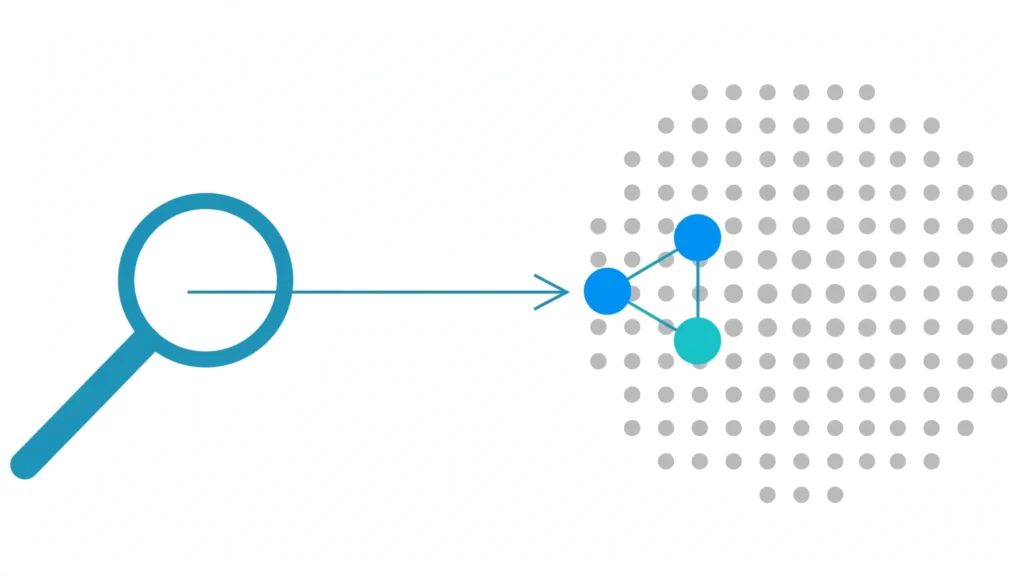
A vector database handles those questions. Instead of storing rows and matching values, it stores mathematical representations of your data — vectors — and searches for the ones closest to your query in meaning. “Closest” here is literal: the database measures distance between points in a high-dimensional space, and nearby points mean similar things.
Search by meaning, not keywords
Here’s the difference in practice. Type “cheap phone with good camera” into a keyword search and it hunts for those exact words: cheap, phone, good, camera. A product described as “budget smartphone with excellent photography” shares almost none of those words — so keyword search misses it entirely, even though it’s exactly what you wanted.
A vector database doesn’t care about the words. It cares about what the words mean. “Cheap phone with good camera” and “budget smartphone with excellent photography” land in almost the same spot in vector space, because an AI model has learned they express the same idea. The query finds the product regardless of the vocabulary mismatch.
This is why people sometimes call it semantic search. The database isn’t matching text; it’s matching intent.
Embeddings, explained without the jargon
The magic ingredient is the embedding: a long list of numbers that captures the meaning of a piece of data.
Take the sentence “The cat sat on the mat.” An embedding model — a trained neural network such as OpenAI’s text-embedding-3 or an open model from Hugging Face — reads it and outputs something like [0.23, -0.15, 0.87, ..., 0.04]: a vector of 768, 1,536, or even 3,072 numbers. You can’t read meaning out of those numbers by eye. But geometrically, sentences with similar meanings produce vectors that point in similar directions.
Think of it like a map where every possible meaning has coordinates. “The cat sat on the mat” and “A feline rested on the rug” get nearly identical coordinates, while “Quantum computing explained” lands in a completely different neighborhood. The database’s job is to store these coordinates efficiently and — given a new query’s coordinates — find the nearest neighbors fast, even when there are millions or billions of them.
Two things worth knowing about embeddings:
- The model matters more than the database. The quality of your search results depends mostly on which embedding model you use, not which vector database stores the vectors. A mediocre model in a great database still gives mediocre results.
- Embeddings are one-way. You can’t practically reconstruct the original text from a vector. So the database stores each vector alongside your original data — the document, the image, the product record — and hands both back when you search.
How Do Vector Databases Actually Work?
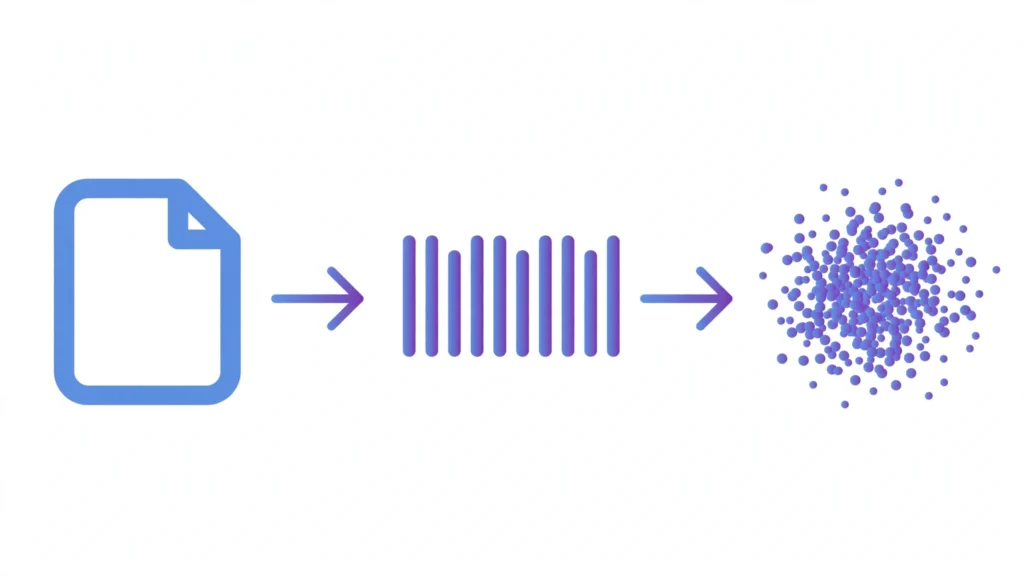
Six things happen between your raw data and a useful search result. Once you see the pipeline, the whole category stops feeling mysterious.
The pipeline, step by step
Step 1:
Raw data comes in. Documents, product descriptions, support tickets, images, audio clips — anything unstructured.
Step 2:
An embedding model converts it into vectors. Each item passes through a trained model (OpenAI’s text-embedding-3, Cohere Embed, an open-source model — your choice) and comes out as a long list of numbers. This happens once per item, not once per search.
Step 3:
Vectors are stored and indexed. The database saves each vector next to its original data and metadata (source URL, timestamp, category, whatever you attach). It also builds a specialized index — essentially a map of the “meaning space” — so it doesn’t have to scan every vector at query time.
Step 4:
A query arrives and gets embedded too. When someone searches, their query goes through the same embedding model, producing a vector in the same space.
Step 5:
The database finds the nearest neighbors. It compares the query vector against the stored vectors and returns the closest ones — the items most similar in meaning. This is where the clever algorithms below come in.
Step 6:
Ranked results go back to your app. The matches, their similarity scores, and their original data are returned. In a RAG setup, these chunks get fed to a language model as context.
The key insight: embedding is the expensive part, and it happens once. Every future search reuses the stored vectors, which is why vector search stays fast and cheap even at large scale.
How “closeness” is measured
“Similar” has to mean something mathematically. Vector databases use distance metrics to score how close two vectors are:
| Metric | What it measures | When it’s used |
|---|---|---|
| Cosine similarity | The angle between two vectors — direction, not magnitude | Text embeddings (the most common default) |
| Euclidean distance | Straight-line distance between two points | Image features and dense vectors where magnitude matters |
| Dot product | The projection of one vector onto another | When vectors are already normalized, it behaves like cosine |
For most text applications, cosine similarity is the default and you rarely need to think about it. The choice matters more in specialized cases like image retrieval or recommendation systems.
Why exact search doesn’t scale
Finding the true nearest neighbor means comparing your query against every stored vector. With a thousand vectors, that’s trivial. With a hundred million, it’s far too slow for anything interactive.
So vector databases cheat — in a principled way. They use approximate nearest neighbor (ANN) algorithms that trade a tiny bit of accuracy for enormous speed gains, returning results in milliseconds that are correct often enough that nobody notices the difference:
| Algorithm | The idea, in plain English | Where you’ll find it |
|---|---|---|
| HNSW | Builds a multi-layer graph of the data, like a highway system with local roads beneath it; search starts at the top layer and zooms in | Qdrant, Weaviate, pgvector, most modern vector DBs |
| IVF | Divides the vector space into clusters and only searches the most relevant ones | FAISS, Milvus, pgvector |
| Product Quantization | Compresses vectors into compact codes so more of them fit in memory | FAISS, Milvus, Qdrant (as a quantization option) |
| DiskANN | An index designed to live mostly on disk, for datasets too big for RAM | Azure AI Search, Qdrant |
| ScaNN | Google’s approach, optimized for maximum recall at high speed | Google Vertex AI |
You don’t need to memorize these. What matters is the takeaway: every vector database is, at its core, an ANN index plus storage, filtering, and an API. The original HNSW paper by Malkov and Yashunin remains the best deep dive if you want the full technical story.
Vector Databases vs. Traditional Databases
It helps to see the two side by side, because the names sound similar but they solve different problems. Neither replaces the other — most real systems use both.
| Traditional database | Vector database | |
|---|---|---|
| What it stores | Structured rows: numbers, strings, dates | Vectors (embeddings) plus the original data and metadata |
| How you query it | Exact match, ranges, joins — WHERE price < 100 | Similarity — “find the 10 items most like this one” |
| What “good” means | Precision: the right rows, nothing else | Relevance: the most similar items, ranked |
| Handles fuzzy questions? | No — “find angry reviews” means nothing to SQL | Yes — that’s the entire point |
| Example systems | PostgreSQL, MySQL, MongoDB | Pinecone, Qdrant, Weaviate, Milvus, pgvector |
| Typical use | Orders, users, inventory — anything exact | Semantic search, recommendations, RAG |
The practical takeaway: if your question has a correct answer you could check by hand (“which customers bought X?”), you want a traditional database. If the answer is a matter of degree (“which tickets are about X?”), you want a vector database. Production AI systems almost always pair them — the vector database retrieves candidates by meaning, and the traditional database holds the authoritative records those candidates point to.
Key Features That Actually Matter
Every vendor lists a dozen features. In practice, six of them decide whether a vector database fits your project or fights you.
Hybrid search
Pure vector search is great until someone types an exact product code or a rare name the embedding model never learned. Hybrid search combines keyword matching (like BM25) with vector similarity, so you get the best of both. If your data includes SKUs, IDs, or proper nouns, treat this as a requirement, not a bonus.
Metadata filtering
Vectors alone can’t answer “find similar articles published this year.” Metadata filtering lets you attach structured fields — dates, categories, user IDs — to each vector and filter on them before or during the similarity search. Every serious vector database has this; the difference is how fast and expressive the filtering is.
Horizontal scaling
A prototype holds thousands of vectors on a laptop. Production holds millions or billions across machines. Check how the database grows: does it shard automatically, can you add nodes without downtime, and what happens to query latency as the dataset grows tenfold?
Quantization and memory efficiency
Vectors are big — a million 1,536-dimensional vectors is roughly 6 GB in raw floats. Quantization compresses them (at a small accuracy cost) so you can fit far more in RAM. If you’re watching infrastructure costs, this feature pays for itself.
Multi-tenancy
If you’re building for many customers, you need their data isolated — separate namespaces or partitions with their own access controls. Some databases were designed for this from day one; others bolted it on later.
Managed vs. self-hosted
This is really an operational question: do you want an API key and zero infrastructure, or do you want to run it yourself for control and cost? There’s no universally right answer — only the one that matches your team’s appetite for operations work.
The Vector Database Landscape in 2026
The market has split into two camps: vector-native databases built for similarity search from day one, and vector-enabled databases that added it to an existing system. Here’s who’s who, and where each one fits.
Pinecone
The fully managed option. You get an API key and no infrastructure decisions — no index tuning, no servers, no ops. The serverless tier charges per read, write, and storage unit with no idle costs, which makes it cheap to start and increasingly expensive as sustained volume grows. Pick it when your team has zero appetite for running infrastructure.
Weaviate
Open source (BSD-3) and built around hybrid search — its BM25 plus vector fusion is the most mature in the category. The modular architecture lets you swap embedding models, vectorizers, and rerankers without rebuilding your schema, and it speaks GraphQL natively. In 2026 it also shipped a native MCP server, so AI agents can query and write to it directly. Pick it when hybrid search depth or multi-tenancy compliance matters.
Qdrant
Written in Rust, runs as a single binary or Docker container — no Kubernetes required for most workloads. Its strengths are filtering (a rich payload query DSL), efficient quantization, and low latency at a low operating cost. Recent releases added GPU-accelerated index builds and multi-AZ clusters with 99.95% uptime SLAs. Pick it when you want to self-host something fast without hiring an ops team.
Milvus
The most widely adopted open-source vector database, with the largest community behind it. It’s a distributed system — separate query, data, and index nodes on Kubernetes — built for genuinely enormous datasets, hundreds of millions to billions of vectors. That power comes with the steepest operational learning curve here. Pick it when you’re operating at billion-scale and have the DevOps capacity to match.
Chroma
The simplest on-ramp: an embedded database that runs locally with almost no setup, and the default vector store in many LangChain tutorials. It’s not built for production scale, and it doesn’t pretend to be. Pick it for prototypes, experiments, and local development.
LanceDB
Another embedded option, aimed at laptops and edge devices rather than servers. It handles frequent updates gracefully and supports multi-vector representations. Pick it when your app runs on-device or you need a zero-infrastructure local store with more headroom than Chroma.
pgvector
Not a database at all — an extension that adds vector similarity search (IVFFlat and HNSW indexes) to PostgreSQL. If your data already lives in Postgres, this is the path of least resistance: vectors and relational data in one system, one backup, one transaction. It’s comfortable into the tens of millions of vectors. Pick it when you’re already a Postgres shop and don’t need a second database.
MongoDB Atlas Vector Search
Vector search built into MongoDB’s managed Atlas platform. You won’t win benchmark shootouts with it, but if your application already runs on MongoDB, you get similarity search with zero new infrastructure and zero data pipelines. Pick it to avoid stack sprawl.
Elasticsearch and OpenSearch
The search veterans. Both combine decades-old, best-in-class full-text search with vector indexes in a single system, which makes them natural homes for hybrid retrieval. Pure vector performance trails the dedicated engines, though. Pick them when keyword search is at least half the job.
Redis
The in-memory speed demon, with a vector similarity module bolted on. Queries are extremely fast because everything lives in RAM — which also means it’s the priciest way to store large vector collections. Pick it when you need real-time similarity search on a hot, relatively small dataset.
Comparing them at a glance
| Database | Type | Open source | Deployment | Best for |
|---|---|---|---|---|
| Pinecone | Vector-native | No | Managed only | Zero-ops teams |
| Weaviate | Vector-native | Yes | Self-hosted + cloud | Hybrid search, multi-tenancy |
| Qdrant | Vector-native | Yes | Self-hosted + cloud | Self-hosted performance per dollar |
| Milvus | Vector-native | Yes | Self-hosted + managed | Billion-scale datasets |
| Chroma | Vector-native | Yes | Embedded / local | Prototyping |
| LanceDB | Vector-native | Yes | Embedded / edge | Local and on-device apps |
| pgvector | Vector-enabled | Yes | Any PostgreSQL | Existing Postgres stacks |
| MongoDB Atlas | Vector-enabled | No | Managed | MongoDB-native applications |
| Elasticsearch / OpenSearch | Vector-enabled | Yes | Self-hosted + managed | Keyword-heavy hybrid retrieval |
| Redis | Vector-enabled | Yes | Real-time search on hot data |
How to Choose the Right Vector Database
Forget the rankings for a minute. The “best” vector database is the one that fits your constraints, and those are different for every team. Walk through these five questions in order — by the end, the field usually narrows to one or two options.
How much infrastructure do you want to run?
This is the first fork in the road, and it eliminates half the list. If the answer is “none,” you’re looking at Pinecone or the managed clouds of Qdrant, Weaviate, and Zilliz. If your team is comfortable running containers — or already runs Kubernetes — the self-hosted options open up and your long-term costs drop significantly.
Be honest here. A self-hosted database you never tune will underperform a managed one you never think about.
What’s your realistic scale?
Not your dream scale — your next-18-months scale. Under a few million vectors, almost anything works, and you should optimize for developer experience, not benchmarks. Tens of millions: pgvector starts straining, and the dedicated engines earn their keep. Hundreds of millions and up: you’re in Milvus or managed-serverless territory, and this decision deserves a proper evaluation.
Do you need hybrid search?
If your users search with exact terms — product names, error codes, legal citations — alongside natural language, you need keyword plus vector search in one query. Weaviate and Elasticsearch/OpenSearch lead here; others can do it with varying degrees of elegance. If everything you search is fuzzy natural language, you can ignore this question entirely.
What does your stack already look like?
The boring answer is often the right one. Postgres shop? Start with pgvector and only migrate when you outgrow it. MongoDB shop? Atlas Vector Search removes an entire category of work. Already on Elasticsearch? Its vector capabilities might be all you need. Every new database is a new backup strategy, a new monitoring setup, and a new thing that pages someone at 3 AM.
How does the cost behave as you grow?
Pricing models diverge wildly. Managed services charge per query, per write, and per gigabyte — beautifully cheap at low volume, and the bill curve steepens right when you’re growing fastest. Self-hosted options cost engineer time up front and flatten out later. Model your costs at 10x your current scale before committing; the cheapest option today is rarely the cheapest option in two years.
A final note: whatever you choose, benchmark with your own data before committing. Public benchmarks use synthetic datasets and query patterns that may look nothing like yours. Load a representative slice of your actual embeddings, run your actual queries with your actual filters, and measure recall and latency yourself. An afternoon of testing beats a week of reading comparison articles.
Where Vector Databases Are Used
Retrieval-augmented generation (RAG)
The use case that put vector databases on the map. A language model on its own can only answer from its training data — which is frozen in time and knows nothing about your company. In a RAG setup, the user’s question is embedded, the vector database retrieves the most relevant chunks of your documents, and those chunks are handed to the model as context. The model answers from your data, not its memory. Most enterprise AI assistants you’ve seen in the last two years work roughly like this.
This is the same retrieval machinery running inside real agent products — our Manus analysis modes comparison shows how Wide Research leans on it to sift hundreds of sources at once.
Semantic search
The most direct application: search that understands intent. Documentation portals, knowledge bases, and support centers use vector search so “how do I reset my password” and “change login credentials” return the same article. It shines anywhere users describe problems in their own words instead of the vocabulary your content was written in.
Recommendation engines
“People who liked this also liked…” has always been a similarity problem. Streaming services, e-commerce stores, and content platforms embed items — songs, products, articles — and recommend the nearest neighbors of what a user already enjoys. Vector databases made this pattern accessible without building custom infrastructure for it.
Fraud and anomaly detection
Fraud has a shape. Embed transactions, login events, or network activity as vectors, and fraudulent behavior clusters together in vector space — even when the individual details keep changing. New events that land suspiciously close to known-fraud clusters get flagged. The same idea catches manufacturing defects, system anomalies, and outliers in any domain.
Multimodal search
Embeddings aren’t limited to text. Models can turn images, audio clips, and video frames into vectors that live in the same space as text. That means you can search a photo library with a sentence, find songs that “sound like” a hum, or match a product photo to its listing. As multimodal models keep improving, this is the use case with the most headroom.
A Minimal Mental Model for Getting Started
Every vector database, regardless of vendor, runs the same three-step loop. Learn it once and every product’s documentation reads the same.
1. Embed. Convert your data into vectors with an embedding model. This is the only step that involves AI — everything after it is just database work.
2. Upsert. Store the vectors in the database, each attached to its original content and any metadata you want to filter on later. (“Upsert” because re-running it updates existing records instead of duplicating them — you’ll re-embed documents whenever they change.)
3. Query. Embed the search query with the same model, ask the database for the nearest neighbors, and get back ranked results.
Here’s what that looks like in practice — this sketch uses Qdrant’s Python client, but the shape is identical everywhere:
python
from qdrant_client import QdrantClientfrom qdrant_client.models import VectorParams, Distance, PointStruct
client = QdrantClient(":memory:")  # swap for a server URL in production
client.create_collection(    collection_name="docs",    vectors_config=VectorParams(size=1536, distance=Distance.COSINE),)
# 2. Upsert: store vectors alongside the original textclient.upsert(    collection_name="docs",    points=[        PointStruct(id=1, vector=[0.23, -0.15, ...], payload={"text": "Refund policy..."}),        PointStruct(id=2, vector=[0.41, 0.09, ...], payload={"text": "Shipping times..."}),    ],)
# 3. Query: embed the question, find the nearest neighborsresults = client.query_points(    collection_name="docs",    query=[0.25, -0.12, ...],  # the embedded question    limit=3,)
In a real application, step 1 and the query embedding happen through your chosen embedding model’s API; the database never sees raw text, only vectors and the payloads you attach. Once this loop clicks, vendor documentation becomes a translation exercise rather than a learning curve.
Frequently Asked Questions
Is PostgreSQL a vector database?
Not exactly. PostgreSQL with the pgvector extension can store vectors and run similarity searches, and for many teams that’s enough. But Postgres wasn’t designed for this — its vector indexes are an add-on, not the core engine. Think of it as a relational database with vector capabilities rather than a vector database. The practical rule: if you already run Postgres and your vector workload is modest, pgvector saves you from operating a second system. If vector search is central to your product and growing fast, a dedicated engine will serve you better.
What’s the difference between a vector database and a vector index like FAISS?
FAISS is a library, not a database. It gives you blazing-fast similarity search algorithms that you run inside your own code — but no persistence, no API, no metadata filtering, no scaling, no access control. A vector database wraps that kind of index in everything a database is supposed to do: store data durably, serve concurrent queries, filter, replicate, and back up. Use FAISS when you’re experimenting or embedding search inside an application you fully control; use a vector database when it needs to run as shared infrastructure.
Can vector databases store images and audio, or just text?
Anything you can turn into a vector. Text is the most common because text embedding models are the most mature, but image, audio, and multimodal models all produce vectors a vector database will happily store. The database itself doesn’t care what the numbers represent — words, pixels, or sound waves are all just coordinates to it.
How many vectors can a vector database handle?
It depends on the system and the hardware, but roughly: pgvector is comfortable in the low millions to tens of millions; Qdrant, Weaviate, and Milvus handle hundreds of millions on a single cluster; Milvus and managed serverless options scale into the billions. These are moving targets — quantization and disk-based indexes keep pushing the ceilings up — so treat any specific number as a snapshot, not a law.
Do I actually need a dedicated vector database, or is pgvector enough?
For a surprising number of teams, pgvector is enough. If you already run PostgreSQL, your vector count is in the single-digit millions, and you don’t need exotic features, adding the extension is the pragmatic choice — one database, one backup, one thing to monitor. Reach for a dedicated vector database when vector search becomes a core workload: high query throughput, heavy metadata filtering, billion-scale data, or hybrid search depth that Postgres can’t deliver.
Conclusion: The Database Matters Less Than You Think
Here’s the uncomfortable truth this guide has been circling: the vector database you choose matters less than the data you put into it.
Across every serious evaluation, the biggest lever on retrieval quality isn’t the engine — it’s the input. Deduplicated, well-chunked, context-complete content embedded with a good model will outperform sloppy data on the “best” database every time. Teams agonize over benchmark tables while feeding their systems thousand-page PDFs chopped at arbitrary boundaries, then wonder why the answers are bad.
And the category itself is dissolving. Vector search is being absorbed into the databases you already run — Postgres, MongoDB, and Elasticsearch all ship it now. The standalone vector database isn’t disappearing, but it’s becoming a specialist tool for specialist scale rather than the default answer. In a few years, “vector database” may sound as odd as “B-tree database” does today: just something databases do.
So the practical advice: start with what you have, obsess over your data preparation, and only reach for a dedicated engine when your scale or query patterns demand it. The teams winning with AI search in 2026 aren’t the ones with the fanciest infrastructure. They’re the ones whose data was worth searching in the first place.